
Laptop security, from theft prevention to getting back to work
Short answer: Set up the basics before you buy clever accessories. That means encryption you have checked, a separate backup you have restored from, account recovery that doesn't depend on this laptop, and sensible habits in public. After that, a lock that fits your exact slot and something solid to anchor it to. A tracking tag is a good extra if it suits your phone and you know what it can and can't do.
Losing a laptop to a thief is several bad days rolled into one. The machine is gone. Work that lived only on that drive may be gone too. Someone else might now be able to open your documents, your browser sessions, or the accounts that control your other devices. And while you work out what was exposed, you still have to replace the hardware and rebuild a normal working day.
So we treat those as separate problems, because they need separate fixes. Keep the laptop under your control. Use a well-fitted physical lock when there is something solid to lock it to. Encrypt the storage, and know what happens to that protection when the lid closes. Keep a backup you can restore without the missing machine. Keep a way back into your important accounts. Add tracking as a possible help with recovery, not a promise.
What we are aiming for is a theft that costs money and patience but stays contained. A cable can't do that on its own. Neither can a perfect backup if the thief also walks off with an unlocked email account.
A note on evidence. Product specs here come from the makers' own pages and manuals. When a number is a maker's pull test, compatibility list or battery estimate, we say so. We have not destroyed a pile of locks in a workshop, and we won't pretend otherwise. This is a researched buying and security guide.
The ladder of protection
These layers work together. Think of them as rungs that support each other. The list starts with not getting robbed in the first place, but please don't wait until your physical setup is perfect before you turn on encryption and backups. Do those today.
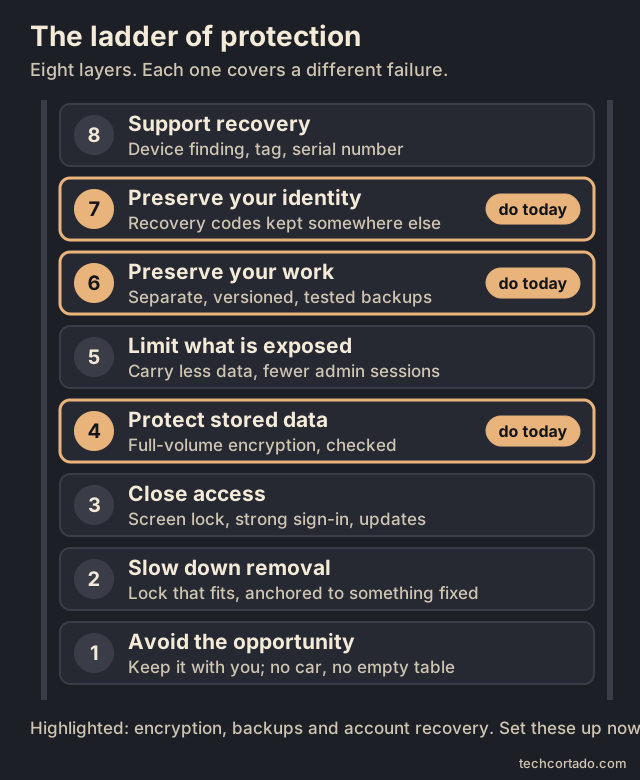
| Layer | What to do | What it can achieve | What it can't promise |
|---|---|---|---|
| 1. Avoid the opportunity | Keep the laptop with you; pick a sensible seat; don't leave it in a car or on an empty table | Fewer easy chances for a thief | No protection against robbery, burglary or your own slip-ups |
| 2. Slow down removal | Match the lock to the slot or bracket and fix it to something that really doesn't move | Interrupts a quick grab and makes removal more work | Surviving every tool, or making an unattended spot safe |
| 3. Close access | Lock the screen, use strong sign-in, keep updates current | Stops casual access through the normal login | Turning a running computer into a switched-off encrypted one |
| 4. Protect stored data | Turn on and check full-volume encryption; keep recovery material safe | Data at rest stays unreadable if the machine or drive is taken | Protecting a session that was already unlocked, or files copied earlier |
| 5. Limit what's exposed | Carry only the data you need; fewer admin sessions and stored secrets | Smaller consequences if something goes wrong | Pulling back copies already made |
| 6. Preserve your work | Independent, encrypted, versioned backups, with restores you've tested | Get your files back and lose less time | Stopping the theft or undoing a leak |
| 7. Preserve your identity | Recovery codes and spare sign-in methods kept somewhere else | Get back into accounts even if laptop and phone vanish together | Helping if every recovery method was in the same bag |
| 8. Support recovery | Turn on device finding, add a suitable tag, write down serial numbers | Leads, proof of ownership, support for a claim | A guaranteed location, remote wipe or police recovery |
The UK's National Cyber Security Centre gives the same core advice for devices: keep physical control, report a loss quickly, and don't store passwords alongside the device. Its data-security guidance also treats encryption, isolated backups and rehearsed restores as separate controls, which is how we've laid them out here.1, 2
Match the effort to the threat
If you work from cafés, the usual worry is a quick grab: the open laptop near the door, the bag on the back of a chair, a distraction while you're packing up. At a shared desk the window can be much longer. In an empty hotel room, a cable may be up against someone with privacy and plenty of time. And a person after your documents is a very different problem from someone who just wants to resell the hardware.
That difference should guide your spending. A plain bag, the habit of taking the laptop with you and a backup at home will often do more for you than swapping one decent cable lock for a slightly better one. A public workstation that stays exposed all day might justify an anchored enclosure or a proper locking station. Sensitive work might justify a separate travel laptop with less data on it and fewer powerful logins.
These are judgment calls about exposure. Nobody has a trustworthy figure for how much a given cable cuts your risk, so we won't invent one.
Prevent the easy theft first
Start with the moment the laptop leaves your control. In a café, that's the walk to the counter. On a train, it's often the stop before yours. At a hotel, it can be the bag you set down by the reception desk. Police advice keeps returning to the same two openings: things left unattended, and distraction. A lock helps when you're working at one spot, but packing the laptop away when you get up is still the stronger everyday habit.3, 4, 5
Pick a seat where you can see both the bag and the computer, and keep the bag closed and next to you instead of hanging off the chair behind you. A stranger offering to "keep an eye on it" is being kind, but that isn't the same as you having it. If someone stops you with a question, a leaflet or a bit of commotion, stay aware of your things. Most of those moments are innocent. This is simply how the Metropolitan Police describe distraction theft working.3
On trains, glance at your bag at each station stop, and take valuables with you when you leave your seat or nod off. Don't run a laptop cable across an aisle or an emergency exit. A restraint that makes sense on a desk becomes a trip hazard in a moving carriage. And a cable doesn't make it fine to wander off to the café car with the laptop still on the table.4, 5
In a car, the best place for the laptop is with you. Hiding the bag doesn't turn a parked car into safe storage. West Yorkshire Police specifically warn against leaving valuables or work equipment in vehicles, boot included. A car alarm is one more layer, and it does nothing for your data.6
Hotels need a decision each time. Take the machine with you when that makes sense, or use the room safe or the hotel's secure storage. Check that the laptop actually fits and that the safe closes without pressing on the lid. Keep doors and windows shut, and don't leave the bag unattended while you check in. A cable to the furniture adds some delay, but we can't vouch for hotel furniture or hotel safes as secure.7
We like a plain, unbranded everyday bag because it doesn't advertise what's inside. That's our preference, not a measured drop in theft. The same thinking applies to luggage labels: give a way to reach you, not a public list of your name and home address. Keep the serial number, the receipt and a few clear photos somewhere you can reach without the laptop. Property registration or forensic marking can help identify a recovered machine, and what's available depends on your country.4, 8
If your employer manages the laptop, use their backup, recovery and incident procedures. Report a loss quickly. Don't switch off company security settings or install your own recovery software to work around them.1
Physical locks in detail
What a cable lock can do
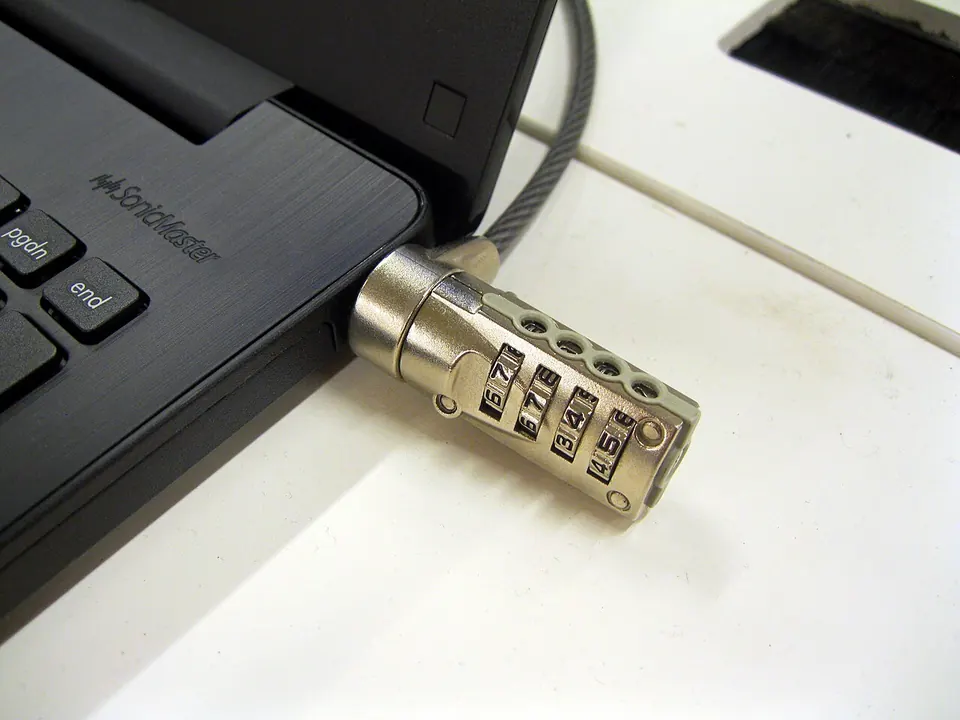
A cable lock earns its place anywhere someone could pick up your laptop and walk off before you notice. Its job is modest: make that grab slower, clumsier and more obvious. One HP security-cable manual says it plainly. The cable is a deterrent and can't guarantee the computer won't be stolen. We think that's the right yardstick for every glossy claim in this category. A lock can be useful without being unbeatable.9

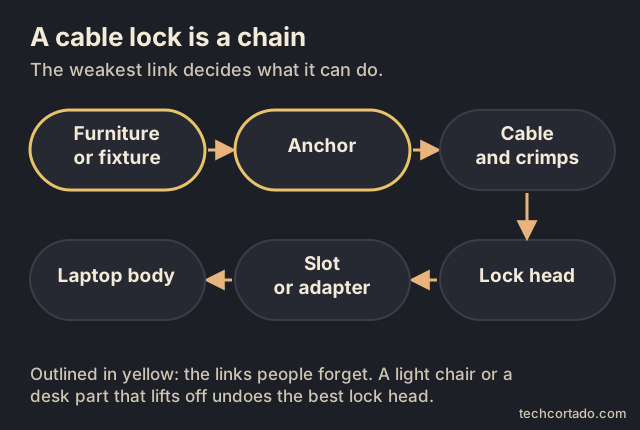
It helps to picture the whole chain: furniture or fixture → anchor → cable and crimps → lock head → laptop slot or adapter → laptop body. That's a way of thinking about it, not a measured ranking. The strongest link doesn't make up for an anchor that the cable can slide off, a weak adhesive bond or a flimsy attachment point. An expensive lock looped around something that can leave with the laptop hasn't achieved much.
So before you buy, look at where you'll actually use it. A properly fitted desk anchor can work well in a home office. A fixed part of the building might do in a shared workspace. A light café chair won't. If there's nothing solid to lock to, keeping the laptop with you is the better call. And keep the cable out of walkways. Security shouldn't come with a trip hazard.
Fit comes before strength
Three slot types cover most of the market. Treat the sizes below as clues for identifying your slot. They aren't engineering drawings, and a tip of a similar size won't necessarily fit.10, 11, 12
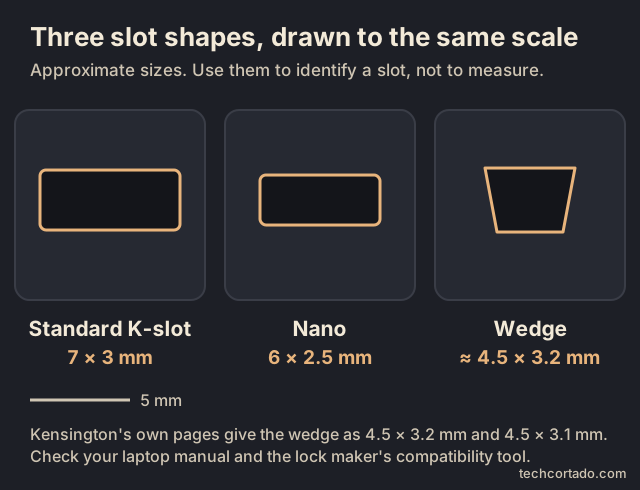
| Slot family | Approximate opening | What it means when buying |
|---|---|---|
| Standard Kensington / K-slot | 7 × 3 mm | Ask for the standard slot by name. "Kensington" on its own is vague, because the company sells other heads too. |
| Kensington Nano | 6 × 2.5 mm | Needs a head that's clearly Nano-compatible, or a universal head that lists Nano. |
| Noble Wedge / wedge-shaped | About 4.5 × 3.1–3.2 mm | Needs explicit wedge compatibility. N17 is Kensington's product family for this slot. |
| No security slot | None | Look at a model-specific adapter, an adhesive adapter or an external locking station. |
Here's a small warning sign buried in the paperwork. Kensington's slot explainer shows the wedge slot as 4.5 × 3.2 mm, while its Simple Solutions installation guide says 4.5 × 3.1 mm. So don't settle the question with a ruler and a product photo. Start from your laptop's exact model and generation and its manual, then check against the lock maker's compatibility tool. The mismatch is a reason to check fit carefully. It doesn't mean there are two different wedge standards out there.10, 11, 13
Dell says outright that its machines don't all take the same lock. Some have standard slots, some have wedge slots, and some have none. When Dell says wedge slots are "not Kensington", it means the standard Kensington-style slot. It isn't a ban on Kensington-branded locks, since Kensington sells wedge-compatible N17 models. Brand names and slot names have got thoroughly tangled, so read the slot type and the exact SKU.12, 14
Universal locks make life easier in a household or office with several different laptops. But "universal" can't add a slot to a laptop that doesn't have one. Some heads need you to set the right tip position before you insert them, and StarTech's UNIVCS manual also has you pick the right spacer. Kensington's 3-in-1 2.0 combination lock uses a different single-tip design with no swappable parts. Read the instructions for the product you bought, not the older one that looks almost the same.15, 16

What to check when it arrives
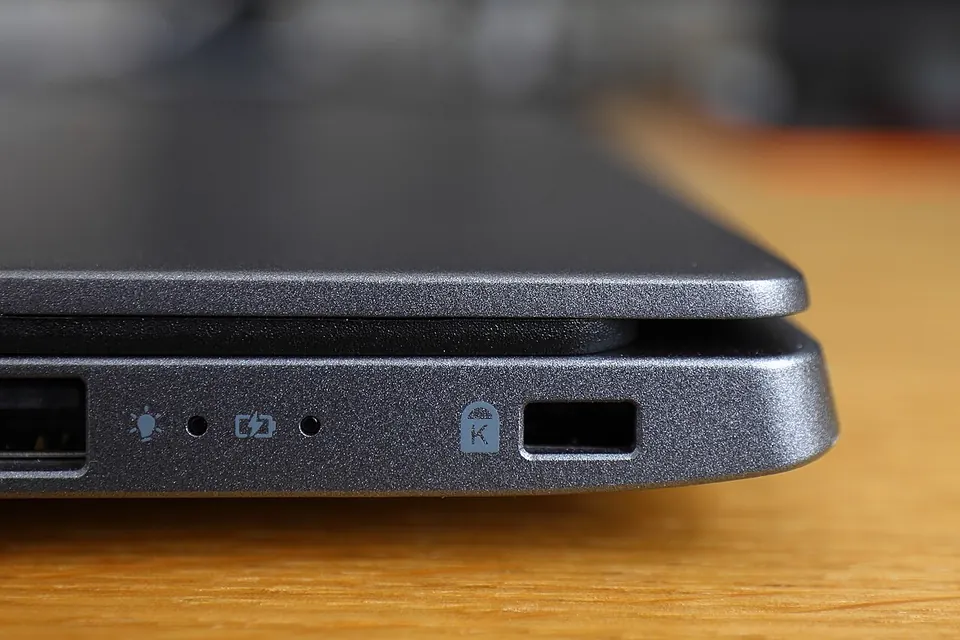
Do the first fitting at home, while you can still return it. Find the slot, follow the lock's guide and use the right spacer. The head should go in without force and sit without levering the laptop up. Nearby ports should still be usable, and the lid should open and close normally. A head that looks compact in the listing can still get in the way on a laptop with a low slot. Noble even lists the height to the slot's midpoint for its TZ03TC, which tells you clearance is a real design limit.15, 17
Once it's locked, give it a gentle tug in the direction someone would pull it off. You're checking that it engaged, not testing its strength. Don't hang the laptop from it, yank the cable or copy a demo video. Leave enough slack to move the laptop a little, but not a loop that a passing bag or knee will catch.
With a combination lock, spin every dial away from the code once it's on. Kensington's manual tells you to scramble all of them. Try out a new code while the lock is off the laptop, or at least where a mistake won't trap your working computer. Keep the code somewhere you can reach from another device.11
Key, combination or both?
A keyed lock is easy if your keys stay in your pocket and a spare lives somewhere else. The way it goes wrong is a key kept in the laptop bag, which can disappear in the same theft. A combination gets rid of the key but gives you a code to remember or store. Skip birthdays, never keep the factory code, and don't write it on the laptop.
Four dials with ten digits each give 10,000 possible codes. That's not comparable to a strong password. A mechanical lock can fail in physical ways, and there's no honest way to turn a code count into "it would take a thief X minutes." How well the lock is made and installed still matters more.16
Hybrid locks need careful reading. Noble's TZ06T opens with a key or a combination. That's handy as a backup way in, but it isn't two-factor protection where you'd need both. Noble also says the key doesn't reset the combination. Product listings saying "key and combination" make this easy to misread.18
Set up recovery before you travel. Kensington's Register & Retrieve service handles replacement keys and stored combination recovery. Protect that account, and keep the lock's ID and receipt away from the laptop. For companies, master keys need just as much thought: they're convenient for the IT team, and they also change who can open every lock.19
Keyed or combination, side by side
| Keyed lock | Combination lock | |
|---|---|---|
| Pros | Nothing to remember. Quick to open. Spare keys, keyed-alike sets and master keys are possible. | No key to lose. Many models let you reset or share a code without handing over hardware. |
| Cons | The key can go missing, or leave in the same bag as the laptop. | A code to remember and protect. Dials can be watched, guessed or decoded on weak designs. |
| Attacks we found documented | Shimming or forcing the head on older designs; cutting the cable.114 | Decoding the dials through design flaws; cutting the cable.113 |
| Lost key or code | A replacement key through the maker's registration service, if you registered first. Otherwise the lock gets cut.19 | Recoverable only if the maker stores codes or an admin can reset the model. Otherwise it gets cut.19 |
| Shared desks | Keyed-alike or master-keyed sets suit an IT team that hands out laptops.46 | Resettable codes suit hot-desking, as long as people really change them. |
| Travel | Fine if the key lives on your keyring, never in the laptop bag. | Nothing to forget at home. Scramble every dial each time. |
Two old stories are worth knowing, as history and not as tests of today's models. In 2004 the Associated Press reported that security researcher Marc Tobias opened Kensington and Targus laptop locks with the barrel of a ballpoint pen, thin plastic or rolled-up cardboard, and a reporter got a Targus Defcon open in minutes. In 2006 Engadget covered a Targus Defcon CL combination lock being decoded through flaws in its design, with the cable cut as well. Both makers have changed their designs since. The lesson that lasts: 10,000 codes on the box tells you very little about how long a lock holds.114, 113
Our pick: keyed for one owner who always has their keys on them. Combination for hot desks, shared kit and anyone who loses keys. Either way, the fit of the head and the thing you anchor to matter more than the choice between the two.
Cable thickness tells you something, but not everything
A small coiled cable is easy to carry. A thick straight one may be annoying enough that you leave it at home. That trade-off is real. In a 2024 article, Kensington published minimum tensile figures for its cable families, and the coiled travel cables come in lower than the standard and Ultra ranges. Those are the maker's family specs. We didn't test them, and they don't cover every product on sale now.20
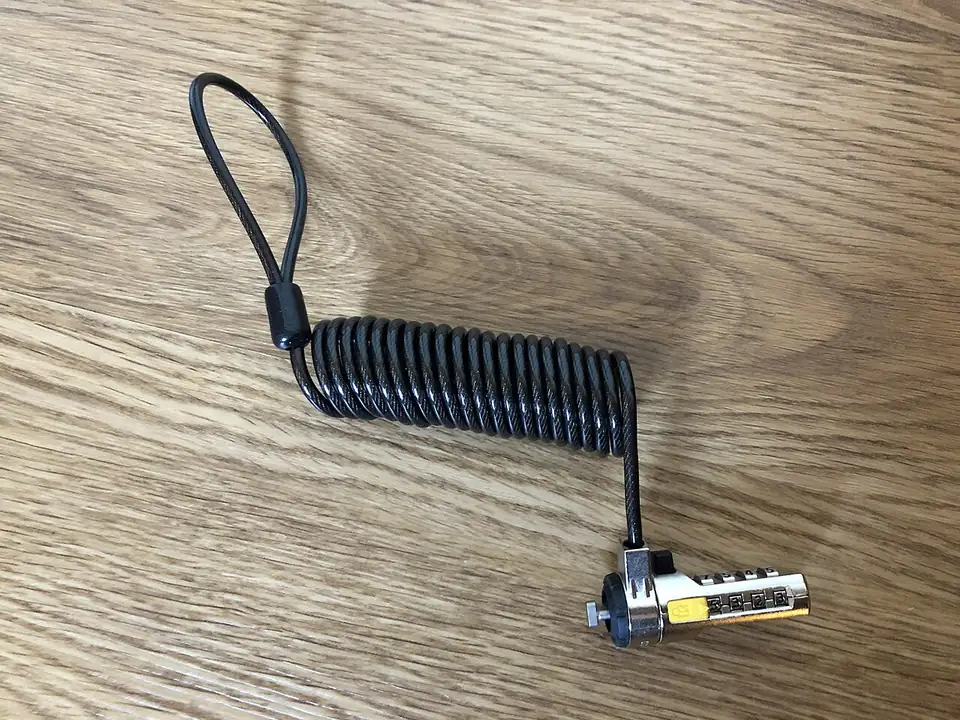

Thickness includes how the cable is built and sometimes the coating, so compare like with like when the specs allow. The force that snaps a cable also isn't the force needed to beat every other part. A strong cable can sit on a weak laptop attachment. The plastic coating mostly protects surfaces. A thick jacket doesn't mean more steel.
A two-headed cable can secure two compatible devices, but check what's really held. Locking a USB-C dock doesn't lock the laptop plugged into it. Lock the laptop as well, unless the dock has a documented way of holding that exact computer. Cable traps for peripheral leads are a convenience, and how well they hold depends on the cable and connector shape. Don't assume everything in the product photo is protected on its own.
Read the test claim all the way down to the fixture
Published force numbers are worth reading, but the details decide what they mean. Noble describes a 150-pound-force wedge test. Kensington describes straight and side pull tests, with the slot held in a fixture in a machine, a set pull rate, and samples pulled until they fail. Those are different descriptions, without enough in common to say one brand is twice as hard to steal as the other. The fair summary is that both makers report testing. Nobody has handed us an independent league table.21, 20
The fixture makes a big difference. A head held in a lab fixture hasn't been tested inside every thin laptop it might end up in. Ask whether a figure refers to the cable, the head, the fixture or the complete assembly. Ask for the SKU, the pull direction, the number of samples, what counted as failure, and the report. And no pull-force result can back up a claim like "safe to leave for five minutes."
Durability is a separate question from resisting an attack. Kensington's history of its testing mentions temperature tests, repeated drops and rotation cycles. That matters for something you carry, bend and use daily. It doesn't turn a warranty into theft insurance, and it doesn't prove a particular thief can't beat your setup. Check the current warranty and any theft cover that's stated separately, rather than assuming either exists.22
Two other labels often get read as more than they are. TAA compliant is about US government purchasing rules on country of origin. ISO/IEC 27001 is about how an organisation manages information security. Neither one, by itself, is a timed attack rating for the cable in your hand. A lock can be part of a company's physical security without carrying a "secure laptop" certificate.23, 24
Slotless laptops: three options, three compromises
A model-specific adapter can give a slotless MacBook a standard T-bar lock point without glue. Compulocks' Ledge range is one example, with versions for different models and sizes. Buy against the exact model identifier, because "fits MacBook" isn't enough. Check case compatibility, clearance and the fitting instructions. An adapter maker's warranty statement isn't the same as approval from the laptop's maker.25
An adhesive adapter suits devices that have no dedicated adapter. Compulocks' Blade uses 3M VHB tape and a retractable lock point. Its advertised holding force is the maker's claim. It doesn't show that it holds as well on every coating, removable skin or older base cover. The surface and the bond become part of your security chain.26
With pressure-sensitive adhesive, prep and waiting time matter. 3M's general VHB guidance calls for clean, dry surfaces and firm pressure, and says the bond builds over time. Its example room-temperature figures reach full strength after about 72 hours. Follow the adapter's own instructions, and only use surface prep that's safe for your laptop's finish. Don't sand a laptop or heat it because an industrial tape guide mentions those steps. Good glue on a poor surface is still a weak point.27
An external locking station holds the laptop with arms or a frame. Kensington's Laptop Locking Station 2.0 works this way without changing the computer. It suits a desk you use every day far better than a light travel bag. Check physical fit, not just screen size. Even the maker's size range and model list don't replace checking your exact laptop.28
For a desk anchor, decide how it will be attached before you order. Kensington sells one with adhesive and one-way screws. Screws in the box only help if your desktop and your fitting can hold them. Ask before drilling a shared desk, and check a fitted anchor now and then.29
Making the buying decision
For one laptop with a known slot, start with a head that clearly fits, has room to sit properly, comes with a suitable cable and goes on a good anchor. With several slot types in the house, a universal head can cut down on mistakes, as long as you understand how to adjust it. For a slotless travel laptop, compare how bulky each exact adapter is and what fitting it needs. For a fixed workspace, improve the anchor before you spend more on the head.
Keep the routine short: anchor, engage, gentle check, take the key or scramble the dials, lock the screen. When you leave, take the laptop with you whenever you can. The lock backs up your attention. It shouldn't become the reason you walk away. Its biggest value may be stopping a quick grab. Encryption and backups handle the much worse day when prevention fails.
Lock and anchor shortlist
This table compares documented fit and features. It isn't a strength ranking from our own tests. Check the exact SKU, your laptop model, local stock, the full price at checkout, the return terms, and whether the cable or adapter is in the box. We didn't put together a like-for-like price comparison for any single country, so prices aren't listed.
| Product and SKU | Interface | Documented cable or fitting | Who it suits, and the catch |
|---|---|---|---|
| Kensington Universal 3-in-1 2.0 Keyed, K63389WW30, 31 | Standard/K-slot, Nano, wedge; one adjustable tip | 1.8 m coated carbon steel; diameter not confirmed | Mixed laptops, or if you might switch laptop. "Universal" still needs a model and clearance check; slotless laptops need something else. |
| Kensington Universal 3-in-1 (previous generation), K62318WW32, 33 | Standard/K-slot, Nano, wedge; swappable tips | 1.8 m carbon steel | Keeping or repairing a lock you already have. Spare tips get lost; don't mix it up with 2.0. |
| Kensington Slim NanoSaver 2.0 EQ, K60630WW34 | Nano | 1.8 m stainless steel | Thin Nano-slot laptop where clearance matters. Not for standard or wedge slots; check local stock and laptop shape. |
| Kensington MicroSaver 2.0, K65020WW (regional variants exist)35 | Standard Kensington/T-bar | 6 ft carbon steel; the 10 mm figure is the HEAD diameter | Standard-slot business laptop. Won't fit Nano or wedge; the website's availability notices are unclear. |
| Kensington MicroSaver 2.0 Portable, K64423 / K67989 variants; check your region36 | Standard | Coiled; extends to 6 ft, packs to about 3 in | Travellers who want small packing. Coiled portability isn't evidence it resists as well as a full desk cable. |
| Noble low-profile flat-key wedge, TZ18T37 | Wedge, for listed Dell consumer/gaming/Alienware models | 1.8 m, 4 mm PVC-coated braided steel; 105 g | Compatible low-profile Dell gaming laptop. Check the model, not just the Dell logo; the 150 lbf figure is the maker's own claim, not a theft rating. |
| Noble compact barrel-key wedge, TZ04T38 | Wedge, for listed Dell Latitude and other models | 1.8 m, 4 mm; 98 g per maker's table | Compatible Latitude, if you prefer a barrel key. A different key type doesn't make it more secure than the flat-key one. |
| Targus DEFCON Ultimate Universal resettable, ASP96RGLX39 | Standard/Nano/wedge, including what Targus calls oversized wedge | 2 m galvanised, sleeved steel | Someone who wants to set their own code. Four digits can be watched over your shoulder; code count isn't attack time; ignore "cut-proof" marketing. |
| Targus DEFCON Ultimate Universal serialised, ASP96GLX-S40 | Standard/Nano/wedge | 2 m galvanised, sleeved steel | IT teams that want managed code recovery. Serialised isn't the same as user-resettable; check local warranty and recovery process. |
| StarTech Universal serialised, UNIVCS-LAPTOP-LOCK41 | Standard/Nano/wedge | 2 m, 4.4 mm carbon steel | Managed fixed-code rollouts that need slot-specific test figures on paper. Preset code can't be changed; listed pull figures differ by slot. |
| Compulocks Ledge MacBook adapter/bundle, MBPR14LDG01KL / MBPR16LDG02KL / MBALDG04KL / MBALDG05KL by exact model25 | Adds a lock point to supported MacBooks | Depends on bundle; check whether a lock is included | Compatible slotless MacBook, travel or desk. Needs an exact chassis match; the load is carried by a small part of the laptop. |
| Compulocks Blade, BLD01 bracket; BLD01KL keyed bundle; BLD01CL combination bundle26 | Adds a standard lock point with an adhesive plate | Depends on bundle | Slotless, flat-backed device with no mechanical adapter. Surface prep, curing and adhesion carry the load; don't block vents; maker's force claim isn't a chassis test. |
| Kensington Laptop Locking Station 2.0, K64453WW with lock / K64451WW without28 | External adjustable arms around a supported laptop | Lock included only in one bundle | A permanent desk with a slotless laptop. Bulky, and needs an exact physical fit; screen size alone tells you little. |
| Targus dedicated T-Lock, ASP48USX42 | Standard T-bar | 6 ft galvanised steel | A dedicated standard-slot alternative. No universal tip; EU version and stock not confirmed. |
| StarTech large anchor, LTANCHORL43 | Desk anchor, not a laptop lock | Ring opening 35 × 19 mm | Permanent desk where you're allowed to mount it properly. The screws are only as strong as the desk; not portable. |
| Targus base plate, PA400P44, 45 | Desk anchor accessory | Compatible cable sold separately | A compatible DEFCON setup with proper mounting. The manual itself calls adhesive-only fitting marginal security. |
Product details that affect the decision
If you have a mix of laptops, Kensington's Universal 3-in-1 2.0 Keyed Lock is worth a look. Announced on 24 March 2026, the 2.0 family uses one tip for standard, Nano and wedge slots instead of separate pieces. That fixes a small, very real annoyance: the right adapter being somewhere else when you need it. The keyed model's reference on the official product sheet is K63389WW. It has a 1.8 m coated carbon-steel cable and a swivelling head. This is a convenience and compatibility argument. It doesn't show that the lock holds up better than a dedicated one.30, 31
Don't confuse it with the older K62318WW, which uses swappable tips. If that older lock already fits your laptop, the "2.0" in the new name isn't a reason to buy again. Check its condition and keep the correct tip with it. Kensington's K62315WW replacement-tip page lists the older compatible models, so don't assume those tips fit the new single-tip design. Some regional pages show an availability warning next to a buy button, so a search snippet isn't proof the lock is discontinued everywhere, or in stock near you.32, 33
StarTech's UNIVCS-LAPTOP-LOCK uses a preset code tied to its serial number, and you can't change it. It has a 2 m, 4.4 mm cable and comes with spacers. Its datasheet shows how a headline number can mislead: the pull figure is 202 lbf for a K-slot, 164.4 lbf for Nano and 110.2 lbf for wedge, rather than one top figure for every slot. Those are StarTech's numbers under StarTech's slot conditions. They don't tell you the odds of theft or how your laptop's casing will behave.41
If you're buying for a team, learn the difference between individually keyed, keyed-alike and master-keyed. StarTech's deployment guide lays it out: keyed-alike means one key opens many locks; master-keyed gives each user their own key plus an admin key; serialised combinations can be looked up from controlled records. Central recovery is useful, but the master key or the code list becomes something you have to protect too. Someone securing one laptop at home doesn't need that kind of setup.46
A good lock tied to something movable makes the wrong part of the system look reassuring. At a regular desk, a well-fitted anchor may be a better upgrade than a new lock head. StarTech's LTANCHORL screws down and has a security plate that covers the screws, and its 35 × 19 mm opening takes thicker cables or several at once. The desk underneath still counts. A screw in crumbly chipboard doesn't become strong because the fitting is metal.43
The Targus PA400P instructions are refreshingly blunt about adhesive-only mounting. They call it "marginal security" and recommend screws together with the adhesive. The same manual asks for more than 24 hours of bonding time and warns about surface types, humidity and installation conditions. That's useful evidence: an adhesive pad isn't instantly equal to a properly fixed anchor. Follow your own anchor's instructions instead of borrowing curing times from another product. The PA400P product page also makes clear it's an accessory, so check and budget for the cable separately.44, 45
MicroSaver 2.0's 10 mm figure describes the head, not the cable. Product titles and nearby numbers can easily blur that.35
None of the recent public comparisons we found tested every lock on this list to destruction under one shared method. The makers' reports back up their own specs. They don't crown an independent winner.
Encryption and the state of the laptop
A cable can stop someone walking off with your laptop. Encryption covers the next failure, when they have it anyway. Its job is to keep what's stored on the drive unreadable without an authorised way to unlock it. That means the obvious files, and also cached email, downloaded bank statements, browser data, app databases and half-finished work sitting in temporary folders. Windows and Ubuntu both describe full-volume encryption as protection for data at rest. Neither claims it hides whatever is already open on an unlocked screen.47, 48
The goal is simple to say. The thief ends up with hardware you can replace, and you keep your work and your accounts. Getting there means checking a few real things: whether encryption is actually on, how the computer unlocks, what the encryption doesn't cover, and which recovery material you'll need after the theft. A recovery key saved only on the stolen laptop is a plan with the first step missing.
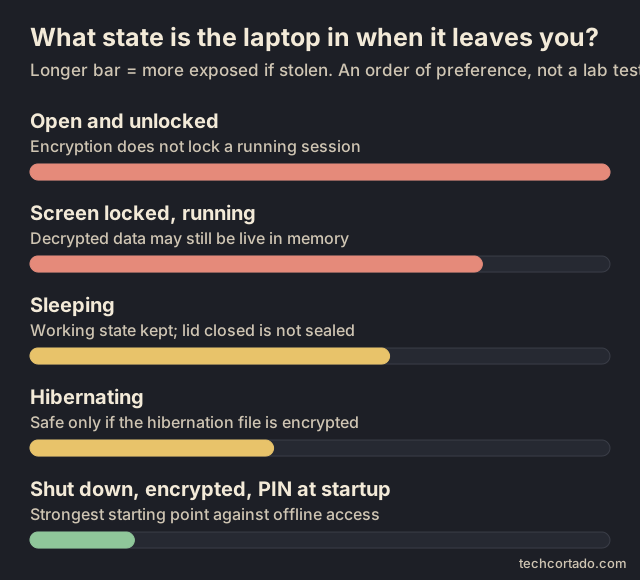
Know what state the laptop is in when it leaves your hands
| Laptop state | What it means if it's stolen | Sensible habit |
|---|---|---|
| Open and unlocked | Apps can already read whatever you've allowed them to. Disk encryption doesn't lock a running session. | Lock it the moment your attention moves away. |
| Screen locked, still running | The login screen is protected, but apps and decrypted data may still be live in memory. Hardware and OS defences matter. | Fine for short breaks while the laptop stays with you. |
| Sleeping | The machine keeps its working state. Closing the lid doesn't seal every secret. | Shut down before carrying sensitive work through places you don't control. |
| Hibernating | Memory is written to disk. Safety depends on that location being encrypted and resume needing authentication. | Use it only once you've checked your OS and encryption setup. |
| Shut down, encrypted, with suitable startup authentication | The strongest starting point against offline access, though hardware, passwords and recovery-key handling still matter. | Make this your travel default for sensitive material. |
Treat this as a defensive order of preference, not a ranking that holds for every laptop design. For Windows machines facing skilled physical attacks, Microsoft specifically recommends a TPM plus a startup PIN, and shutting down or hibernating instead of using standby. TPM-only unlock is a fair baseline against opportunistic theft, but hibernating doesn't magically add a second startup factor.49
Back in 2008, the original cold-boot research showed memory could hold data long enough to undermine the encryption products of the time. That's why the power state belongs in any theft plan. It doesn't show that today's Apple-silicon Macs or every modern Windows laptop can be attacked the same way. Modern hardware needs its own evidence.50
Windows: check the protection, don't just trust a padlock icon
Windows Home isn't automatically left out. Microsoft offers Device Encryption on eligible Home machines, while the more configurable BitLocker Drive Encryption controls come with Pro, Enterprise and Education. Whether it switches on by itself depends on setup. Microsoft says signing in with a Microsoft, work or school account can turn on Device Encryption and save a recovery key to that account, while setting up with a local account doesn't. So look at the actual machine rather than assuming the edition name tells you the answer.51
To check without changing anything, open Command Prompt as administrator and run:
manage-bde -status
It lists your drives and their encryption and protection status. Check every drive that holds anything you care about. Read the encryption percentage together with Protection Status, because a percentage alone proves little. The system drive will normally show as unlocked while Windows is running. That's expected, not a fault.52
The difference really matters after repairs or firmware updates. BitLocker protection can be suspended while the data stays encrypted, which leaves the key available without the usual protection. The laptop looks encrypted but isn't protected the way you think. Recheck after any servicing, and if protection is suspended, have whoever manages the machine fix it. Don't play with protector-deletion commands to tidy up the output.53
A TPM ties unlocking to the expected startup environment. A separate BitLocker startup PIN or startup key adds a step before Windows starts or resumes from hibernation. That's a different thing from the Windows sign-in PIN, which comes later. The extra step has a cost: unattended restarts and recovery get less convenient. We'd choose it for a travel laptop carrying sensitive material, if your organisation's setup allows it.54
The NCSC backed this up in August 2026. Writing about weaknesses in the Windows Recovery Environment, including the now-patched YellowKey issue, it recommends authentication before Windows boots instead of assuming disk encryption alone closes every route. It also covers Network Unlock for companies and TPM-plus-startup-key setups where typing a PIN isn't realistic. Our takeaway: patch Windows and its recovery components, and keep the extra startup factor where you can. A PIN doesn't replace updates.55
Keep Secure Boot on and the firmware up to date. On hardware that supports it, look for Kernel DMA Protection in System Information (msinfo32) or in Windows Security's memory-access settings. DMA lets some external devices read memory directly, and Microsoft uses the IOMMU, a hardware gatekeeper for those devices, plus driver isolation to limit what they can reach. It depends on your hardware and firmware, it doesn't cover every older port or physical attack, and it doesn't make random accessories trustworthy.56
Device Encryption doesn't automatically cover external USB drives, so encrypt your portable backup disk separately. If a second internal drive holds virtual machines or project archives, include it in your check too. An unprotected second drive can hold exactly what the thief is after.47
macOS: built-in hardware encryption and FileVault aren't the same promise
Macs with Apple silicon or the T2 chip encrypt their internal storage automatically. Turning on FileVault ties your login password into the protection of the keys. So "my Mac already encrypts its SSD" isn't a reason to leave FileVault off. Apple says FileVault keys on these machines are handled in the Secure Enclave, a separate security processor, and aren't directly exposed to the main CPU. Claims that every modern Mac's disk keys sit in ordinary memory are wrong. Older Intel Macs and external drives need their own attention.57
Check System Settings → Privacy & Security → FileVault. Pick the recovery option that suits the machine and keep it somewhere other than the computer. If you use a separate recovery key, store it safely away from the Mac. If you rely on account recovery, make sure you can get into that account without this laptop. Lose both the login and the recovery route and the files can be gone for good.58
A locked Mac is still a running computer. Apple's security documentation separates hardware generations, boot modes and data-protection classes, including data that stays available after the first unlock. So don't read "Secure Enclave" as meaning every document, session and app is sealed whenever the screen locks. For sensitive travel, shutting down is still a clear habit, without claiming every platform works the same inside.59
Turn on Find My before anything goes missing. On supported Macs, Activation Lock depends on the right account and startup-security settings. It can survive a remote erase and make the Mac less useful to a thief. That's a different job from FileVault, which keeps data private. Neither one stops someone physically taking the machine.60
We cover Find My's recovery actions and their limits further down. Set them up before you need them.
Linux: check the storage layout, not just the distro logo
Ubuntu's usual encryption uses LUKS and dm-crypt. In plain terms, LUKS locks the real encryption key behind one or more passphrases or unlock methods, and your login password is a separate layer from the disk passphrase. A familiar login screen doesn't tell you the disk underneath is encrypted. On a personal machine, the encryption option your distribution offers during installation is usually easier to trust than converting an existing system by hand. Back up first and follow the instructions for your release. An encryption installer isn't a harmless checking tool.48
Check the root filesystem, any separate home or data partitions, swap, and external drives. Hibernation writes your working state to storage. The kernel documentation explains that encrypted resume storage has to be unlocked before the system can resume. So "I encrypted my home folder" doesn't prove the hibernation image is safe. The kernel's old example scripts explain how it works; don't paste them into a current laptop. Use your distribution's supported setup.61
TPM-backed encryption on Ubuntu needs careful version labels. The Ubuntu 24.04 documentation still calls the feature experimental and describes limits around the generic kernel and extra drivers. Don't stretch that to every newer release, and don't read it as a knock on ordinary passphrase-based LUKS.62
Ubuntu 26.04 documents optional startup PINs and passphrases for its hardware-backed scheme. It describes the passphrase as an extra cryptographic requirement that still holds even if the TPM protection is broken. Current requirements include specific UEFI and TPM2 support plus Secure Boot, and automatic unlock relies on the hardware being trusted. Having a TPM chip doesn't prove your whole setup is supported.63, 64
On 26.04, Security Center handles setup and lets you replace the recovery key. Replacing it cancels the old one. Check your version before following recovery steps: the 24.04 page describes a stored recovery key you can read, while the 26.04 instructions describe replacing a lost key while you can still log in. Sort out recovery before something breaks, not at the boot prompt.62, 65
If you're comfortable with Linux, also keep a backup of the LUKS header, the small block at the start of the disk that holds the key slots, and understand what it can unlock. The cryptsetup FAQ warns that encrypted disks still need backups, and that cloning a LUKS image keeps the same underlying key. Changing the passphrase on a clone doesn't make it independent. That matters if you hand out VM or laptop images. Don't fix a theft problem by quietly giving several machines the same secret.66
Encrypted containers make a useful extra compartment
A VeraCrypt container can keep a small set of sensitive files apart from everyday use, especially if it stays closed most of the time. It doesn't replace encrypting the system drive. Opening a document puts its contents in the app's memory, and that can end up in an unencrypted hibernation file if the system disk isn't protected. Encrypt the system drive as well, and check how your OS behaves.67
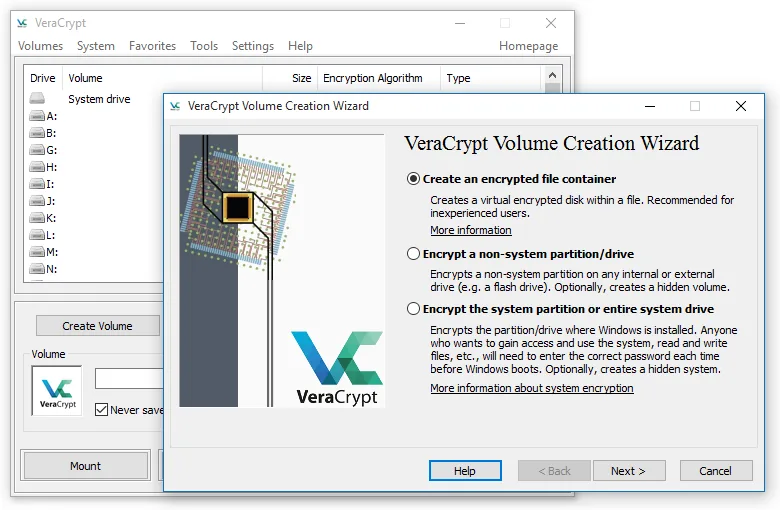

Closing the container doesn't guarantee the editor or viewer has wiped every trace from memory. VeraCrypt documents this limit itself. Its memory-protection features depend on version and compatibility, so having VeraCrypt installed doesn't mean they're switched on. The habit that holds up: close the sensitive work, unmount the container, and shut down before the laptop leaves your control when the situation calls for it.68
Last point here. Encryption can't stop malware from reading documents your running system has opened, or from capturing passwords as you type them. Keep the OS, the browser and your key apps supported and updated. Encryption, app isolation and account security cover different failures, and you need all three.69
Recovery keys are part of your security
A BitLocker recovery key is a 48-digit unlock code. Depending on how encryption was set up, it might be in your Microsoft account, your employer's account, on a printout or on a saved USB copy. Microsoft can't recreate it if every copy is lost. Before you travel, check you can reach it from a second trusted device. Never post it in a screenshot or a support forum. On a work laptop, use IT's key escrow and incident process instead of copying company recovery material into your personal cloud.70
The recovery code should be easy for you to reach and out of reach for whoever takes the bag. A password manager you can open on another trusted device is one option. A well-protected offline copy is another. Avoid the circle where your only password-manager access, your second factor and your recovery key all leave with the laptop. Encryption should make a theft survivable. It shouldn't turn an ordinary motherboard failure into permanent loss.
VeraCrypt, BitLocker, FileVault or LUKS, side by side
People often ask whether free VeraCrypt beats the encryption built into the operating system. For the system drive, the honest answer is that each does a slightly different job. Here is how they compare on what changes daily life.

| VeraCrypt (system encryption) | BitLocker (Windows Pro, Enterprise, Education) | Device Encryption (Windows Home and others) | FileVault (macOS) | LUKS (Linux) | |
|---|---|---|---|---|---|
| Cost | Free and open source, also for commercial use115 | Included with those Windows editions47 | Included on eligible devices51 | Included in macOS58 | Free, offered by most installers48 |
| Which systems | System drive: Windows on x64 only, not ARM64. Containers: Windows, macOS, Linux, FreeBSD116, 117 | Windows | Windows, including Home | Mac | Linux |
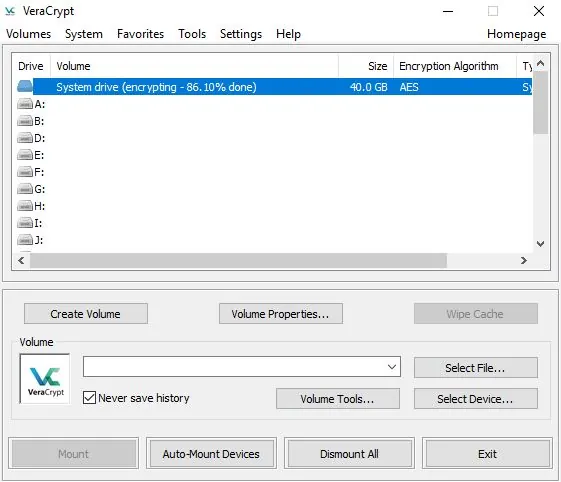
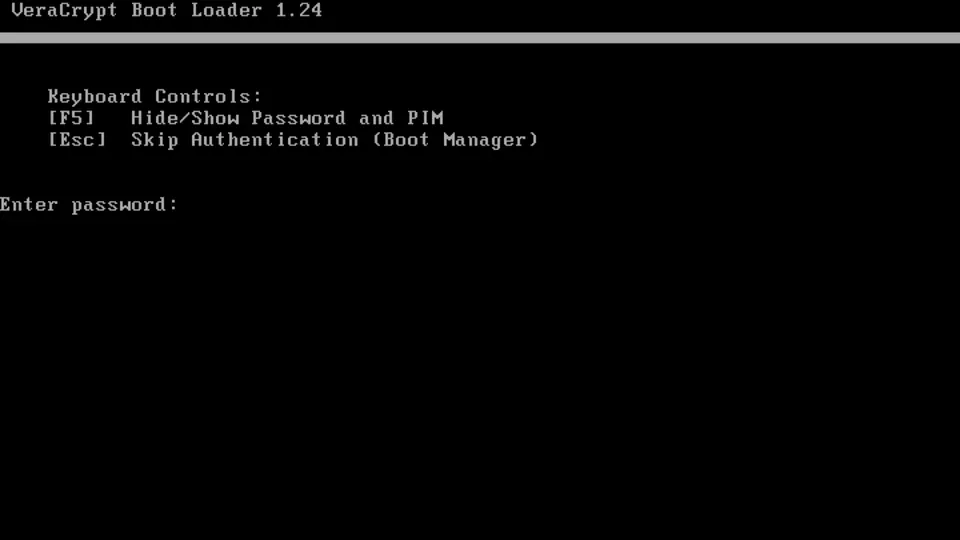
| Password before Windows/macOS/Linux starts | Yes, at VeraCrypt's own boot loader, typed on a US keyboard layout118, 115 | Optional startup PIN or USB startup key47 | Unlocks automatically with the TPM; we found no documented startup PIN on Home51 | Your login password unlocks the disk at startup58 | Passphrase at boot by default48 |
| TPM plus PIN | No TPM use, by design115 | Yes, recommended for sensitive travel54, 55 | No PIN option found | Apple hardware keys plus your password, not a TPM57 | Optional TPM2 plus PIN with systemd-cryptenroll, or Ubuntu 26.04's hardware-backed mode122, 63 |
| Hidden volumes or hidden OS | Yes120, 115 | No | No | No | No |
| If you forget the password | No recovery and no backdoor. The Rescue Disk repairs the boot loader or header but still needs your password115, 119 | 48-digit recovery key you save, print or store in your account70 | Recovery key saved to your Microsoft account automatically51 | iCloud account or a recovery key. Lose both and the data is gone58 | Spare passphrase slots and a header backup you make yourself66 |
| Speed | Uses AES hardware acceleration, including at boot121 | We did not benchmark | We did not benchmark | Apple silicon and T2 Macs encrypt storage in dedicated hardware57 | We did not benchmark |
| Effort | Highest. You must make a Rescue Disk. The FAQ says to decrypt the system drive before reinstalling or upgrading Windows, while the newer system-encryption page describes handling feature updates, so read the current notes before a big upgrade119, 115, 118 | A few settings, plus a PIN policy if you want one | Often already on | One switch | Easiest at install time |

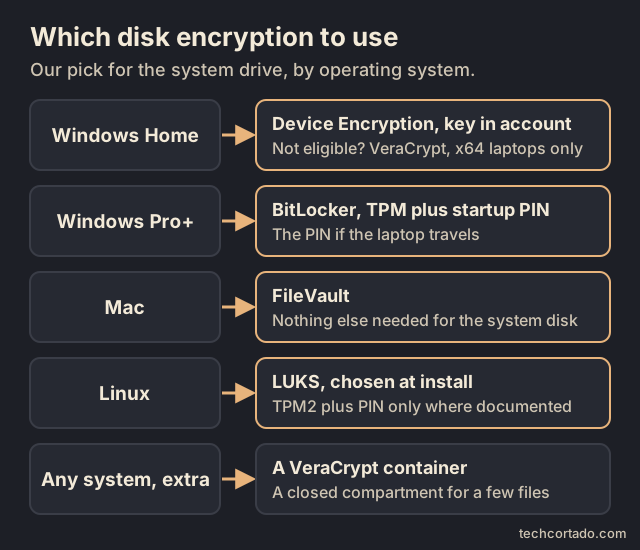
Our pick.
- Windows Home: check Device Encryption is on and that the recovery key is in your Microsoft account. If your laptop doesn't qualify, or you want a password before Windows starts, VeraCrypt system encryption is the free option on x64 laptops. It can't encrypt the system drive on ARM64 Windows.
- Windows Pro and up: BitLocker with TPM plus a startup PIN if the laptop travels.
- Mac: FileVault. Nothing else is needed for the system disk.
- Linux: LUKS chosen at install. Add TPM2 plus PIN only where your distribution documents it.
- Any system: a VeraCrypt container is a handy extra compartment that opens on Windows, macOS and Linux. Hidden volumes exist for people facing pressure to hand over a password. That is a specialist need; read VeraCrypt's own warnings before relying on one.120
Firmware, boot and tamper protection
Encryption protects the data. The firmware settings decide what else the laptop will agree to start, and that matters most in the minutes a thief, or a curious stranger in a hotel, has alone with it.
Firmware passwords
Most business laptops let you set passwords in the firmware (UEFI, often still called BIOS). Lenovo's ThinkPad guide describes a power-on password, asked for at every start, and a supervisor password that protects the firmware settings themselves. Two details from that guide are worth knowing. The laptop doesn't ask for these passwords when it wakes from sleep. And if you forget the supervisor password, Lenovo has no service procedure to remove it: an authorised provider replaces the system board, for a fee. So store it in your password manager the moment you set it. Other PC makers use similar settings under different names. Check your own manual; we couldn't load Dell's or HP's pages for this guide.125, 126
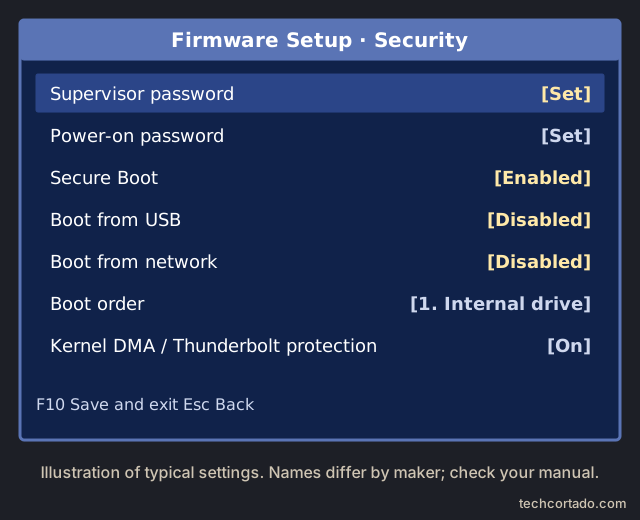
Macs differ by chip. On an Intel Mac, a firmware password stops anyone starting up from another disk or from Recovery without it. On Apple silicon, there is no firmware password. Apple says to turn on FileVault instead, and starting from an external system requires an authenticated change to the startup security policy.123, 124
Boot order, USB boot and Secure Boot
On a PC, set the internal drive first in the boot order and turn off booting from USB and the network if you don't use them. The supervisor password is what stops someone from simply switching those back. Keep Secure Boot on. Microsoft describes it as only letting trusted, signed software run while the PC starts, which makes swapping in a tampered boot loader harder.127, 125
Thunderbolt and DMA attacks
Some fast ports can read memory directly. Microsoft's Kernel DMA Protection blocks that from untrusted devices on supported hardware. The 2020 Thunderspy research showed how much time an attacker needs on older systems without that protection: "5 minutes alone with the computer, a screwdriver, and some easily portable hardware", even with Secure Boot, a firmware password and full-disk encryption on, if the laptop was left asleep. The defences are the ones this guide keeps coming back to: shut down rather than sleep when you leave it, use a startup PIN, and keep firmware updated.56, 128, 49
The "evil maid"
In 2009 Joanna Rutkowska's team showed the "evil maid" attack on an encrypted laptop left in a hotel room. Someone boots it from a USB stick for a minute or two and plants code that records the password the next time you type it. The demo targeted TrueCrypt, VeraCrypt's predecessor, but the idea is general. A firmware password, USB boot turned off, Secure Boot and TPM-based checks all make it harder. If BitLocker suddenly asks for its recovery key after the laptop was out of your sight, treat that as a warning sign rather than a glitch.129, 49
Tamper-evident seals, glitter included
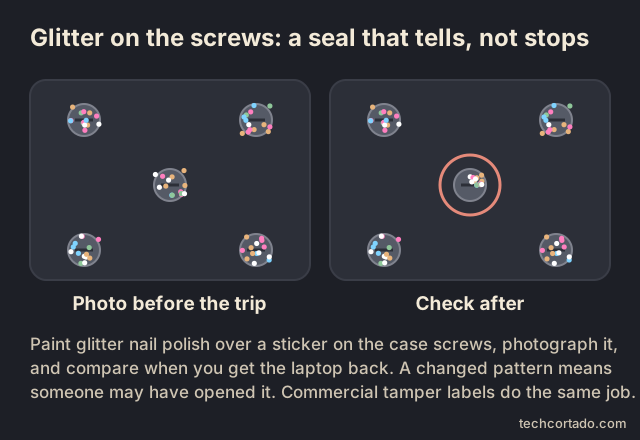
A seal won't stop anyone. It can tell you afterwards that someone opened the case. In 2013 researchers Eric Michaud and Ryan Lackey suggested painting glitter nail polish over the case screws: the random pattern is very hard to copy, so you photograph it and compare later. Critics noted the limits. Glitter can shift, real polish is hard to remove when you need a repair, and painting it on a sticker over the screw works better. Commercial tamper-evident labels do the same job with less mess. Either way, it only helps if you actually take the photo and check it.130, 131
Screen, sign-in and account protection
Lock it when you walk away, and get help remembering
The screen lock is the cheapest protection here. Windows key + L locks a PC, and Control-Command-Q locks a Mac. Two built-in features can help on the days you forget.
- Windows Dynamic Lock pairs with your phone over Bluetooth. Microsoft says it locks the PC within about a minute after the phone goes out of range, but only if the PC is also idle, and calls it an extra barrier, not a replacement for locking it yourself.139, 140
- Presence sensing on some Windows 11 laptops can turn the screen off when you leave, if the laptop has the sensor. Pair it with a short lock timeout so a dark screen also means a locked one.142
- Apple Watch unlocks a Mac when you sit down. That is a convenience. Apple's page describes unlocking, needs two-factor authentication on your Apple Account and still asks for the password after a restart. We found no Apple feature that locks a Mac when the watch walks away, so keep the shortcut habit.141
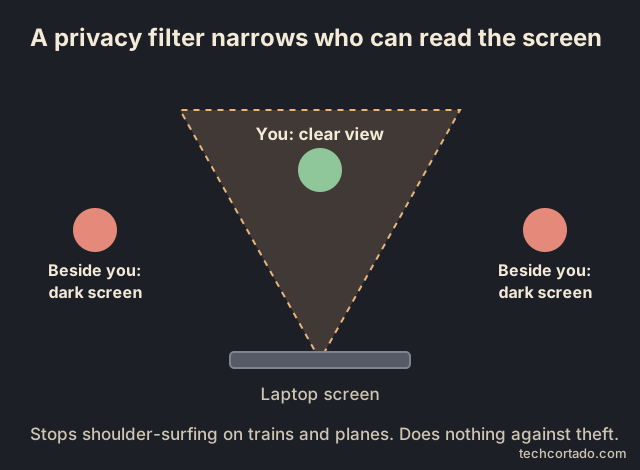
A privacy filter narrows the viewing angle so the person next to you on the train sees a dark screen. That stops reading over your shoulder. It does nothing against theft.143
What we couldn't find is a built-in consumer alert that tells you when someone types wrong passwords at your laptop's own login screen. Your Google, Microsoft and Apple accounts can warn you about new sign-ins to the account; the laptop itself generally won't. A canary token on the desktop of a decoy account, covered below, is one way to get an alert from the machine.

Keep the second factor off the laptop
If the laptop holds your password manager, your email and the app that makes your login codes, one theft hands over all three. Keep at least one second factor somewhere else. A hardware security key on your keyring is the strongest common option, and passkeys built on the FIDO standards resist phishing. Google lists a second security key among the ways back in if you lose one, so register two and keep one at home.144, 145, 88
Plan for the day you can't get in
Password managers have recovery tools for exactly this. 1Password's Emergency Kit holds the Secret Key you need on a new device. Bitwarden's emergency access lets a trusted contact request access after a waiting time you set; it is a premium feature. Set one up, print what needs printing and keep it away from the laptop bag.89, 146
Carry less
The less a laptop is signed into, the less a thief gets. For travel, a separate user profile, or a cheap travel laptop, with only the accounts you need for the trip is a calm middle ground. The setups near the end of this guide show where that makes sense.
Backups and account recovery
A stolen laptop causes at least two separate problems. Someone else may get your information, and you may lose access to it. Encryption deals with the first. Backups deal with the second. You need both. A perfectly encrypted laptop holding the only copy of a manuscript is still a disaster when it disappears. A flawless backup can't un-read documents someone already saw on an unlocked machine.
Here's the test we'd use. Could you borrow or buy another computer, get back into your essential accounts and pick up your most important work, all without touching the missing laptop? Try it for real rather than assuming. The Canadian Centre for Cyber Security names lost and stolen devices in its backup guidance, and it recommends multiple copies, offsite storage, encryption and test restores.71
Keep copies in places that fail separately
The well-known 3-2-1 rule is a good starting point: three copies counting the one you work on, on two different devices or kinds of media, with one copy offsite. For a laptop, that could be the internal SSD, an encrypted external drive kept at home, and a separately protected cloud or offsite backup. The right mix depends on your data and your risks. The home drive saves you when a travel bag goes missing. The offsite copy saves you if your home is burgled or damaged. These are examples, and no service is immune to failure.71
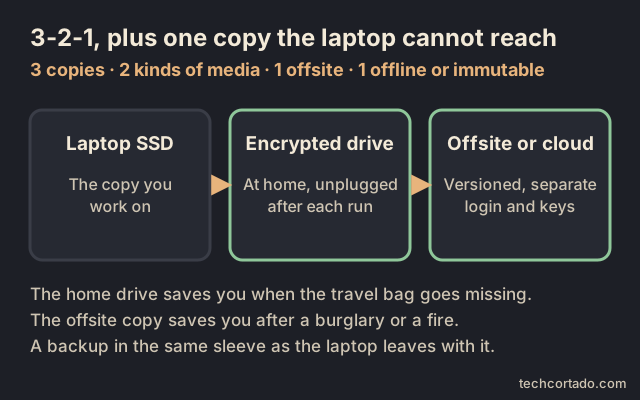
Then add the part the slogan leaves out. At least one useful copy should be safe from deletion by the laptop itself. The NCSC points out that 3-2-1 on its own doesn't require any copy to be offline. CISA recommends offline, encrypted backups and regular testing, because ransomware may go looking for reachable backups and destroy them. A network share that's always connected is another location, but whatever can wreck the laptop may be able to wreck that too.72, 73
Physical distance matters as well. A backup SSD in the same sleeve as the laptop is handy on a trip, and it's gone the moment the sleeve is. Unplug a removable backup when it finishes and store it somewhere else. If you take a travel backup with you, keep another copy that stays home.
Cloud, local drive or both, side by side
Prices below were checked on 29 October 2026 in US dollars and change often. Drive prices in 2026 are unusually high and jumpy, so check the price history before buying rather than trusting one shop's "deal".
| Cloud backup service | Local SSD | Local hard drive (HDD) | Both (the 3-2-1 idea) | |
|---|---|---|---|---|
| Example prices, 29 Oct 2026 | Backblaze Personal: $99 a year per computer, unlimited data, including attached external drives. IDrive Personal: $11.99 a month listed for 5 TB, with cheaper yearly or promotional prices at times, plus a free 10 GB tier.132, 134 | Samsung T7 2 TB: $399.95 to $449.99 at in-stock US sellers tracked by Pangoly, about $200 to $225 per TB. The same drive's 2023 low was $99.99.137 | WD My Passport 5 TB: $224 to $284.99, about $45 to $57 per TB.138 | One drive plus one service, so roughly the two added together |
| Restore speed | Limited by your internet. Backblaze lists zip downloads of up to 500 GB per request, and a mailed encrypted USB drive that is free if you return it within 30 days.132 | Fastest | Fast, slower than SSD | Restore from the drive, fall back to the cloud |
| Theft, fire, flood | Survives anything that happens at home or in the bag | Lost too if it travels or sits with the laptop | Same as SSD | Survives |
| Ransomware and mistakes | Version history helps. Backblaze keeps 30 days by default, one year free if you switch it on, and "forever" for $0.006 per GB per month.133 | Safe while unplugged; at risk while connected | Same as SSD | One copy stays offline or versioned72 |
| Encryption | Backblaze uses AES-128 by default, with an optional private key only you hold.132 | Yours to turn on (BitLocker To Go, FileVault for Time Machine, LUKS or VeraCrypt)77 | Same as SSD | Both |
| Version history | Built into the service | Time Machine and File History keep versions; a plain copy doesn't76 | Same as SSD | Both |
| Weak spots | Needs internet; the first upload can take days; your account becomes a key to your data | Easy to forget to plug in; easy to lose | Dislikes drops and knocks | More to set up and check |
Cloud sync is not on this list on purpose. iCloud+ at $9.99 a month for 2 TB in the US, and Google One at $9.99 a month for 2 TB, are storage that mirrors your changes, deletions included. They are useful, but a backup they are not unless the service keeps versions you can restore.135, 136
Our pick. Most people: a hard drive for fast restores plus one cloud backup service for everything else. That is the 3-2-1 idea at the lowest cost. Pick an SSD over an HDD only if the drive travels or you restore often. If you can afford only one, choose the cloud backup for a laptop that travels, because a drive at home doesn't help when you need to restore abroad. If you have a slow connection, it's the other way round.
Cloud sync helps, but read the recovery terms
A synced folder can save your work when the hardware disappears, and that's valuable. It doesn't automatically give you a separate, protected history, though. Deletions and bad edits can sync across, a full storage quota can quietly stop uploads, and someone signed into your account may be able to change the remote copy. Judge a service by how many versions it keeps, its deletion rules, its account controls and how restoring actually works.
OneDrive is a good example. Microsoft's whole-drive restore lets eligible Microsoft 365 subscribers roll back changes from the last 30 days. Its deleted-files help gives different normal retention periods for personal and work or school accounts, and admins can change the latter. Neither page promises recovery once something is permanently deleted from the recycle bin. So a sync service can help you recover without being your final copy that nobody can delete.74, 75
Before a trip, open a few recently changed files from another trusted device. Check the dates and the contents. A green tick on a folder you rarely use says little about the project you worked on yesterday. If you use cloud-only files, make sure your backup tool copies their actual contents. A placeholder on disk doesn't contain the file.
What the built-in tools really cover
On a Mac, Time Machine is a sensible first layer. Apple describes hourly, daily and weekly backups, with older ones removed as the disk fills. Check the date of the last successful backup, not just that Time Machine is on. Encrypt the backup disk as well as using FileVault on the laptop, since they protect different drives. Apple also warns that switching some network backups to encrypted can erase the existing backup set, so read the steps before changing it.76, 77
Local snapshots are handy for undoing mistakes while you still have the Mac. They live on the same internal disk, though, so they won't help after a theft. Apple itself recommends a separate backup location even when you have local snapshots.78
On Windows, the name Windows Backup can suggest a full disk image. It isn't one. Microsoft describes backing up selected user folders through OneDrive, some settings, and your pinned apps. Some apps will need downloading and installing again. Check folders outside the default locations, software licences, local databases and specialist app data separately.79
File History is another Windows option. It keeps older copies of personal files on an external drive or network location. Check which folders it covers instead of assuming it gets everything. Its restore screen can save to a different location, which is the better choice for a test because it won't overwrite the file you're working on. Protect the backup drive against theft and prying eyes.80
A Linux route, with keys you can recover
If you're comfortable running a Linux system, restic or Borg can give you versioned, encrypted backups to local or remote storage. Neither one maintains itself. Check you're on a supported version, set the folders to include, schedule the jobs and set up alerts when they fail. A script that's been failing quietly for six weeks isn't a backup.
Restic warns that access to a repository depends on its password. Keep the password and the repository location reachable without the laptop. Restic lets you add several access keys to one repository, which can separate everyday access from emergency access. They all open the same repository, though, so they don't create an extra copy. Don't leave your only working credentials in a file that disappears with the computer.81, 82
Borg's encryption mode is chosen when you create the repository. Its documentation recommends backing up the key separately. The exported key is itself encrypted, so you'll also need the passphrase to recover. Don't seal a key export in an envelope and forget that second part. Borg also warns that if both the key and passphrase were exposed, changing the passphrase doesn't replace the underlying secrets. That's a job for moving to a new repository key.83, 84
For more advanced setups, give the laptop's credentials only the backup permissions they need. Borg's append-only server mode is one documented way to do this, but it has limits: direct filesystem access can get around it, and maintenance with full rights or compaction changes the protection. A remote repository with full delete rights saved on the laptop is a weaker arrangement. Check the real permissions before calling any backup immutable.85
Test the restore, boring bits included
Checking a backup's integrity and actually restoring from it answer different questions. Restic's normal check doesn't read every data pack. Its full data check does, at a cost in time and bandwidth. Even a clean result doesn't prove you picked every folder that matters, or that your accounting software will open on a new computer.86
Do the test restore into a new, empty folder. Restic's restore documentation explains that, by default, it can overwrite existing files at the destination, which is a good reason not to experiment on your live work folder. Leave the originals alone while you test.87
A monthly drill could be: restore one recent document, an older version of something, a photo and a small folder with subfolders. Then open them in their apps. Every few months, use another trusted computer or a clean, separate environment and follow your written recovery notes. If a local database export or a virtual machine is essential to your work, include it. Apps with databases may need their own backup method, because copying a running database or VM file isn't the same as a tested restore.
Write down the backup date, what you restored, how long it took and anything missing. That gives you two useful limits: how much recent work you could lose, and how long recovery really takes. It also catches forgotten passwords before a thief forces the issue.
Recover your accounts, not just your files
The missing laptop may have held your password manager, your email, your second factor and your backup console all at once. Avoid that circle. Register a spare security key or another recovery method before you need it, and keep it out of the travel bag. Google explains how to sign in with a backup factor or key you registered earlier after losing your main one. Buying an unregistered spare afterwards won't get you back in.88
If you use 1Password, the Emergency Kit, the Secret Key and the recovery code each do a different job. The kit records your account details. The Secret Key works with your account password when you sign in on a new device, and it isn't a reset code. Recovery codes for individual and family accounts can restore access, but that process also needs access to the linked email account. Plan around those links and keep sensitive recovery material safely away from the laptop.89, 90, 91
After a theft, check and sign out the missing computer's sessions from a trusted device. Google notes that one device can have several sessions, and each may need attention. Also review service-specific tokens and backup credentials, depending on the risk and your provider's instructions. Changing a password and signing out remotely aren't always the same thing.92
And carry less. A travel laptop rarely needs your entire archive, every customer record, every server login and every exported password file. Take what the trip needs, set up a controlled way to reach the rest, and test it. The less that's on the machine, the less a failure elsewhere can cost you. Your backups get smaller and restores get faster, too.
An example maintenance schedule
| When | What to do | Worth remembering |
|---|---|---|
| Before every trip | Run a fresh backup and confirm when it finished; open current essential files from another trusted device; leave at least one encrypted copy at home. | A routine like this helps, but it isn't continuous protection. |
| While you're working | Use automatic versioned backups, as often as matches how much work you could bear to lose; look into errors and storage warnings. | Hourly backups only limit loss to about an hour if the jobs finish and cover the right data. |
| Weekly (example) | Update the encrypted removable copy that lives elsewhere; confirm it finished; unplug it and put it back. | A weekly offline copy could be up to a week behind if the others fail. |
| Monthly (example) | Restore a few typical files and an old version into a new empty folder, open them, and note the result. | A small sample is useful, but it doesn't check everything. |
| Every quarter, or after big changes (example) | Rehearse recovery on another trusted computer, including accounts, decryption keys, essential apps and real work files. | Test more deeply when the setup is more valuable or complicated. |
Tracking tags and asset labels
A tag can tell you where something was last detected. It can't hold the laptop to the desk, encrypt its files or rebuild your work. Treat the location and its timestamp as a lead. A dot on a map doesn't prove the laptop is still there, or that a particular person or flat has it. Bluetooth finding depends on radio conditions and on other people's devices passing by, and Tile says outright that its tags don't offer GPS or real-time tracking.93, 94, 95, 96
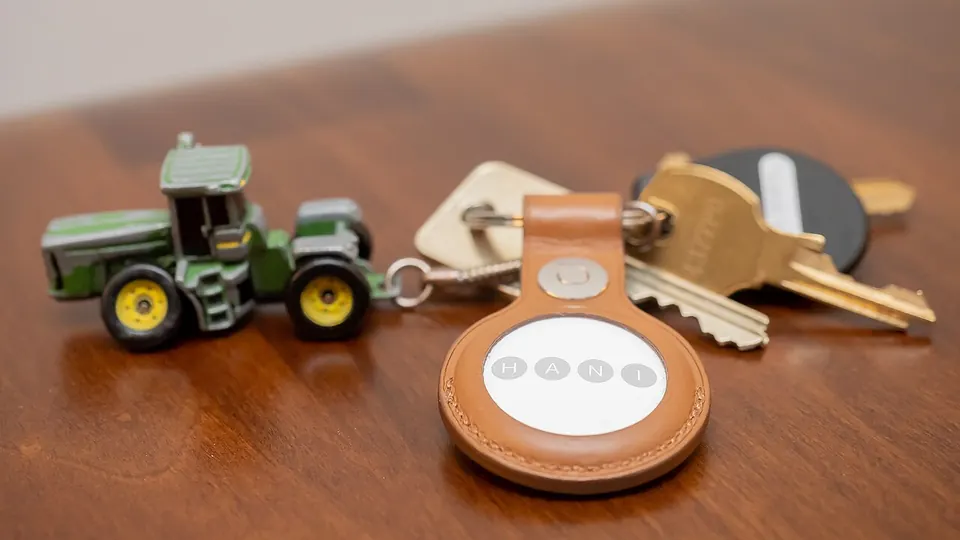
.jpg)
Three quite different things get called "tags." An asset label shows who owns the item. A QR recovery label lets an honest finder get in touch. A Bluetooth tracking tag takes part in a finding network. A printed QR sticker doesn't send a location. And a tag in the laptop bag follows the bag, so if the laptop and bag get separated, so do their locations. Decide which object you actually want to find.8, 97, 96
Pick the network your phone can manage. If you have an iPhone, an AirTag or another Apple Find My accessory is the obvious choice. With a Pixel or other Android phone, get a tag that clearly says it works with Google's Find Hub. Samsung's SmartTag2 is a Galaxy accessory, not a general Android one. If you already use Tile, its own network is a separate option. This is about fitting your phone. Nobody has shown one network recovers a measurably higher share of stolen laptops.98, 99, 100, 97, 101, 102, 95, 96
With AirTag, check you're reading about the current model. Apple launched a second-generation AirTag on 26 January 2026, with changes to finding range and sound. Its specs include Bluetooth, UWB (ultra-wideband, the short-range radio behind precise "it's right here" finding) and NFC, plus a replaceable CR2032 battery. Specs from the 2021 model don't belong in a 2026 buying guide. Check your phone, OS version and region before ordering, since not every Apple device supports every precision-finding feature. Apple's range improvements are its own figures, not our results.103, 98
Test that you can reach the tag without the laptop, not just that it pairs. Apple says AirTags and Find My accessories are located in the Find My app, and the iCloud Find Devices website doesn't fully replace that for AirTags. If your only compatible device could vanish in the same bag, set up another way to reach Find My ahead of time.93
On Android, Google documents several offline finding settings. "Without network" isn't the one for finding your belongings with tags. The crowd-based settings use detections from other Android phones nearby. The "busy places" and "everywhere" options change how your phone takes part, but no setting can conjure up nearby phones or promise instant updates. Test your tag at home and on a normal journey, and recheck permissions after you change phones.99, 94
Chipolo POP works with either Apple Find My or Google Find Hub and takes a replaceable CR2032 battery. Pebblebee Clip 5 is rechargeable and also supports either network, though Pebblebee is clear it's one at a time. It also has a QR recovery feature in its app. "Works with both" doesn't mean "reports to both at once." The exact model matters, because older and similarly named products can support different networks.100, 97
Samsung's SmartTag2 spec page lists which Galaxy phones and tablets it works with, and UWB features need a UWB-capable Galaxy device. The long battery life it quotes is Samsung's estimate. Good for planning, but still check the battery before a trip.101
Tile's core finding features and network don't need a subscription. Judge the paid extras by what they actually do. Tile says its Smart Alerts notify you when your phone leaves a set area, roughly five to ten minutes after you go. If the tagged laptop leaves and your phone stays put, you won't get that alert. So it's a "you forgot something" reminder, not a reliable snatch alarm.102, 104
Apple's Notify When Left Behind is useful in the same way, for forgetfulness. Check notification permissions and the trusted locations where alerts are switched off, and test it on purpose. The words "separation alert" don't mean instant theft warning.105
Anti-stalking protections matter too. Apple and Google both describe alerts when an unknown tag travels with someone over time. Those protections are right to have, and they also mean a thief may find out about a consumer tracker. Don't buy one expecting it to stay hidden forever, and don't tamper with its safety features.106, 107
Tile's Anti-Theft Mode makes a different trade. Tile says it hides registered tags from Tile's own Scan and Secure and some other scanning tools. It requires ID-and-selfie verification and periodic re-verification. Read the terms before turning it on. We're not presenting it as a guarantee of staying hidden, of getting the laptop back, or of any payout. The privacy cost is part of the decision.108, 109
Tracker comparison
| Tag or label | Phone ecosystem and network | Power | What to check |
|---|---|---|---|
| AirTag (2nd generation, 2026)103, 98, 93, 106 | iPhone/Apple household; Apple Find My | Replaceable CR2032 | Your phone, OS, UWB and regional support; Find My app needed to locate it; anti-stalking alerts; no guaranteed recovery |
| Chipolo POP100 | iPhone or Android with Google Find Hub; Apple Find My or Google Find Hub | Replaceable CR2032 | Exact model compatibility; choosing a network isn't a proven security advantage |
| Pebblebee Clip 597 | Android or iPhone user who wants a rechargeable tag; Apple Find My OR Google Find Hub, one at a time | Rechargeable | Remember to charge it; set up the finding network before the companion app; a bag tag follows the bag |
| Samsung SmartTag2101 | Compatible Samsung Galaxy owner; Samsung ecosystem | Replaceable CR2032 | Not for Pixel or other Android phones; UWB needs compatible Galaxy hardware |
| Tile102, 95, 96, 108, 109, 104 | Households already using Tile/Life360, after checking how well it works locally; Tile network | Depends on model | Core finding free; Smart Alerts are a paid extra and don't warn you when the item moves without you; Anti-Theft Mode needs ID checks |
| Asset/QR recovery label8, 97, 96 | Proof of ownership and a way for honest finders to reach you; none for a plain label, QR service as described | None | No location tracking of its own; share as little contact info as possible |
Built in finding and remote actions
Turn on your laptop's recovery features before you travel, and check it shows up in the right account. Microsoft's consumer Find My Device needs a personal Microsoft account, an administrator account and setting up in advance. The documented actions are locate and lock. Don't expect a consumer remote-wipe button on Windows because some corporate management tool has one. Work laptops need your organisation's own procedure.110
On a Mac, turn on Find My beforehand. Apple says remote lock or erase only works when the Mac is powered on and online, even though an offline location may sometimes show. So a map update doesn't prove an erase command got through. Apple's Mac guidance for lost devices warns that erasing stops further finding, while its general Find My guidance has device-specific exceptions. To be safe, assume erasing may end your ability to locate it, and decide based on how sensitive the data is.111, 93
Eligible Macs can keep Activation Lock after a remote erase. Signing out a session or removing a lost Mac from a trusted-device list is not the same as removing it from your Find My account. Apple's removal instructions explain that removing Activation Lock lets someone else set the device up. Follow the lost-device steps exactly, and don't click the "remove device" option meant for selling or giving away a Mac when it's been stolen.60, 112
Anti-theft software and built-in finding, side by side
Tags find bags. Software on the laptop itself can report where the laptop is, as long as it is switched on, signed in somewhere and online. Laptops have no GPS of their own, so these services estimate location from nearby Wi-Fi networks or the IP address.
| Apple Find My (Mac) | Microsoft Find My Device | ChromeOS | Prey | Absolute Home & Office | |
|---|---|---|---|---|---|
| Cost | Free | Free | Free | Starter $2.99 a month for 5 devices, checked 29 Oct 2026147 | Paid; we didn't check current prices |
| Locate | Yes93 | Yes, with location turned on110 | Managed (work or school) devices only, through the admin153 | Yes, with "enhanced accuracy"; Prey describes GPS and Wi-Fi triangulation147, 148 | Yes |
| Lock | Yes111 | Yes110 | Admin can disable a managed device153 | Screen lock, alarm and on-screen message147 | Depends on edition |
| Erase | Yes111 | No consumer wipe documented110 | Not for consumers, as far as we found | Business "Protection" tier, $1.95 per device a month billed yearly147 | Depends on edition |
| Stays after a wipe | Activation Lock on eligible Macs60 | No equivalent we could find | Enterprise enrolment ties the device to the organisation153 | No | Firmware module on supported laptops can bring the agent back after a reinstall or drive swap151, 152 |
| Worth knowing | Erasing may end your ability to locate it111 | Whoever is using the laptop sees a notification when you locate it110 | Consumer Chromebook finding: unverified, Google's page was gone | Missing reports every 10 or 20 minutes with opt-in camera photos and screenshots147 | Premium edition promises up to $1,000 if they can't recover the laptop, sold only in the US, Canada, UK and Australia151 |
Our pick. On a Mac, Find My plus Activation Lock covers most people at no cost. On Windows, turn on Find My Device, and add Prey149 if you want reports with photos, an alarm and finding on Linux too. Absolute is mostly a business tool; its firmware persistence is the one feature that survives a thief wiping the drive, if your laptop model supports it. Prey's help pages once described free accounts for up to three devices; the current pricing page shows no free plan, so treat a free tier as unverified.150
Thief photos have a legal side. Prey's camera photos are opt-in and only for a device you own and have marked missing. In 2012 the US Federal Trade Commission settled with DesignerWare, whose "Detective Mode" let rent-to-own shops secretly take webcam photos, log keystrokes and capture screens on computers people were renting. Use these features on your own laptop, tell anyone who borrows it, and hand the results to the police rather than acting on them yourself.154
Remote wipe has limits. Every service here needs the laptop to be on and online to receive the command. A thief who keeps it offline, or wipes it first, stops it. That is why encryption, done before the theft, does the real protecting, and why a decoy account that lets a thief reach the internet can help the finding services (see the honeypot section below).111
Hiding a tag inside the laptop. We don't recommend opening the case for this: warranties, batteries and heat are all good reasons not to. Anti-stalking alerts will also tell a thief's phone that an unknown tag is travelling with them, hidden or not. A slim tag in a zipped inner pocket of the sleeve is the gentler option, knowing that the laptop and the sleeve can part company.106
Stickers, labels and property marking
You can buy stickers that say a laptop is GPS tracked, plates that leave a "stolen" mark when torn off, and invisible inks only a UV lamp shows. Do any of them stop a thief? We looked for real studies. Here is what we found, including where we found nothing.
What the evidence says
- Property marking with warning stickers, Wales, 1985. Households that marked their property and showed a sticker had 40% fewer burglaries (128 down to 74). But not one stolen item was recovered thanks to the marking, and the author put the drop down to the publicity and stickers, not the marks themselves.155
- Forensic marking kits, England, 2021 study. Burglaries fell by about 82% in the first six months after kits and signs went out, then crept back to the old level by twelve months.156
- Aarhus, Denmark, randomised trial. 6,603 houses were offered forensic marking and stickers; only 32% took part. Burglaries were 21% lower over 15.5 months across everyone offered, and the effect faded. The authors thought the contact letters themselves may have done part of the work.157
- North Zealand, Denmark, randomised trial, 12,000 households. Burglary rates were 4.6% with marking, 5.1% with a placebo and 4.9% with nothing. No significant difference overall. Households that actually put the stickers up did slightly better, short of significance.158, 159
- Warning stickers on cars. The US Problem-Oriented Policing Center says warning signs "generally do not act as a significant deterrent" to experienced offenders, and that in one survey 82% of car thieves said a vehicle watch sticker wouldn't put them off.160
All of these are about homes and cars. We found no study of stickers or marking on laptops, and none at all on fake "GPS tracked" stickers. A fake tracking sticker could put off a casual thief, or prompt a careful one to look for the tracker and switch the laptop off sooner. Nobody has measured which. The honest summary: marking may help for a while when it is publicised, it rarely gets things back on its own, and it works best as proof of ownership.
What each option is for
| Type | Rough cost | What it may do | Limits |
|---|---|---|---|
| "Property of / reward if found" label | A few cents to a few dollars | Helps an honest finder return it; shows ownership | No location; keep contact details minimal, such as an email made for the purpose |
| Fake "GPS tracked" sticker | Low | May put off an opportunist | No evidence either way for laptops; can be peeled off; may make a thief more careful |
| Security plate (for example STOP) | Paid; we didn't check current prices | Hard-to-remove plate with an ID; the maker says removing it reveals an etched "Stolen Property" mark, and runs a recovery line161 | Maker's claims only, no independent study found; the mark spoils resale, which is the point, and also your own resale |
| UV pen marking | Low | Invisible ID that police can read under UV light | Ink may fade, so check it now and then; only helps if the laptop is found and checked |
| Forensic liquid (SmartWater-style kits) | Paid | Unique traceable code; the trials above used kits like these | Effects seen for homes faded within about a year156, 158 |
| Engraving the case | Low to moderate | Permanent visible ID | Lowers resale value; don't drill or engrave near batteries |
| Serial number registration | Free | Police can match a found laptop to you. In the UK, Immobilise is a free register police can search, and it alerts the CheckMEND second-hand check. In the US, Washington DC police ask you to keep the serial so they can enter it into the FBI's national crime database.162, 163 | Only helps after a theft; other countries vary, so ask your local police |
Our pick. Register the serial number (free and useful), add a small return label, and use UV or forensic marking if your local police scheme supports it. Buy a security plate if visible marking appeals to you, knowing the evidence is the maker's. Skip fake GPS stickers unless you simply like them; nothing shows they work.
Canary tokens, decoy files and an unencrypted honeypot
Everything so far tries to stop a theft or limit the damage. This section is about getting a signal from the laptop after it's gone. It is a side project, not a core layer, and it only works if the thief, or whoever buys the laptop from them, goes online and pokes around.
What a canary token is
A canary token is a tripwire you can make for free at canarytokens.org, run by Thinkst. You get a file or a link. When someone opens it, you get an email with the time and the address it came from.164, 165
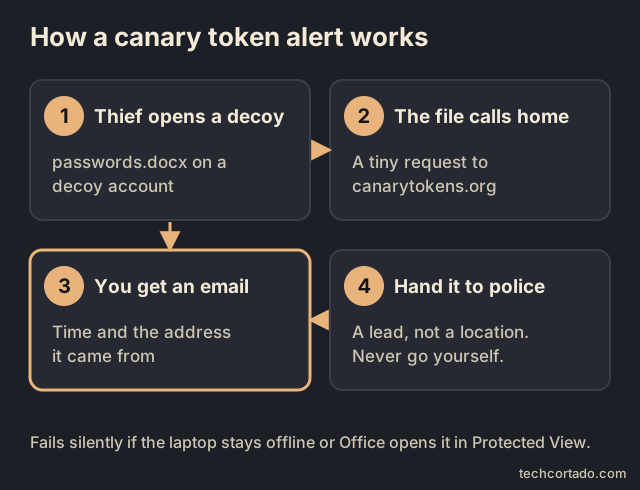
| Token | What fires it | Good for | Limits |
|---|---|---|---|
| Word document | Opening it in Microsoft Office on Windows or macOS166 | "passwords.docx" on a decoy desktop | Office may open files in Protected View, read-only, and the token may not fire there172 |
| Excel workbook | Opening it in Office on Windows or macOS167 | "bank-accounts.xlsx" | Same as Word |
| Opening it in a "reasonably compliant" PDF reader, through a DNS lookup168 | Works through strict networks | Gives only a rough idea of where; some readers won't fire it | |
| Web bug (link) | Anyone visiting the URL169 | Browser home page or a bookmark called "Online banking" on the decoy account | Needs someone to click or load it |
| Windows folder | Someone browsing a folder that holds the token's desktop.ini file, including inside a zip170 | A folder named "Tax returns" on a decoy account | Windows only |
| Self-hosted | Same tokens on your own server171 | People who don't want a third party in the loop | Needs a domain and an internet-facing server |
What you get is a lead, not a location. The address may belong to a mobile network or a VPN. Hand it to the police with your report; don't go looking yourself.
The unencrypted honeypot
A decoy only works if a thief can reach it, and full-disk encryption is designed to stop them reaching anything. That is the trade-off. Here is how it plays out on each system.
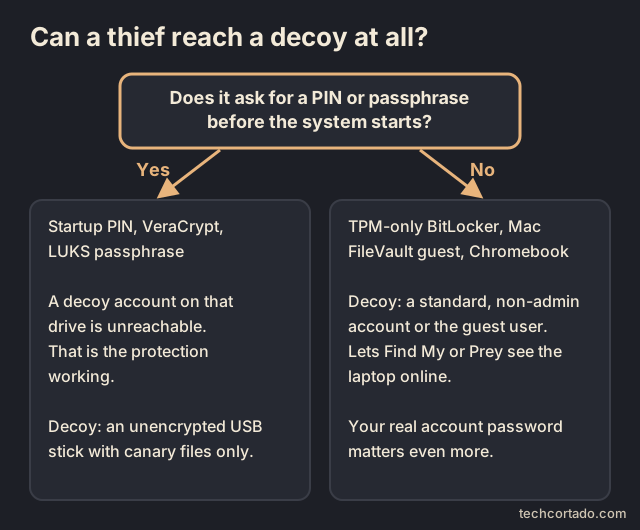
- Mac with FileVault: this works out of the box. With FileVault on, a Guest User can use Safari but can't reach your encrypted disk or create files, and anything a guest does is deleted at logout. Apple says guest access works with Find My, so you can locate the Mac if someone logs in as a guest and uses Safari. Canary files can't live in the guest account, so put them on a decoy USB stick instead.174
- Chromebook: guest browsing is built in and the owner can turn it on or off. Signing out of guest mode deletes the session's files. Work and school Chromebooks follow the admin's settings.173
- Windows with BitLocker unlocking automatically (TPM only): the laptop starts to the login screen, so a decoy account is reachable. Microsoft keeps the built-in Guest account off by default and calls it a security risk, so use an ordinary standard, non-administrator local account as the decoy instead.175
- Windows with a startup PIN, VeraCrypt or LUKS with a boot passphrase: nobody reaches a login screen without the PIN, so a decoy account on that drive does nothing. That's the protection doing its job. If you want a decoy here, use an unencrypted USB stick in the bag, labelled something dull like "Backup", holding only canary files.
- A separate unencrypted decoy OS in the boot menu is possible, but it fights with Secure Boot and boot settings and adds a lot of upkeep. We'd leave it to enthusiasts.
Our view on the trade-off: if your data is sensitive, keep the startup PIN and use the decoy USB stick. If your laptop already unlocks automatically to the login screen, a decoy account costs little and gives Find My, Find My Device or Prey another chance to see it online. Two honest cautions for that case. A decoy account gives a thief a running system where your encrypted drive is already unlocked, protected only by your own account's password and Windows' permissions. And a strong password on your real account matters even more.
Setting it up, step by step
- Get the basics right first. Encryption on, a strong password on your real account, and Find My, Find My Device or Prey turned on and tested.
- Make an alert email that isn't your main address, so a forwarded alert can't reveal much about you.
- Create the tokens at canarytokens.org: one Word, one Excel, one PDF and one web bug. Use the memo field to note which file goes where.
- Create the decoy. Mac: turn on the Guest User. Chromebook: leave guest browsing on. Windows (TPM-only unlock): add a local standard account with an ordinary name and no admin rights, not linked to any Microsoft account. Linux: a separate user that isn't in the admin (sudo) group.
- Plant the files and link. Put the documents on the decoy desktop with tempting names, set the web bug as the decoy browser's home page, and add a Windows folder token if you like. On a Mac, use the USB stick for the files.
- Test it. Log in to the decoy, go online, open each file and the link, and check each alert arrives. Then put it back exactly as a stranger would find it.
- Recheck after big updates. System upgrades can change guest settings or reset accounts.
Risks to keep in mind
- Nothing real on the decoy. No real documents, no saved passwords, no browser sync, no signed-in email.
- No admin rights. An admin decoy is simply a second door into your laptop.
- Some systems limit it. Windows discourages its Guest account, Mac guests are Safari-only with FileVault, and managed laptops follow the organisation's rules.
- Alerts aren't guaranteed. Offline machines, Protected View, file previews and blocked lookups all stop a token firing.
- Keep it a tripwire. Tokens only report that they were opened. Never plant anything that damages a computer, and never act on an alert yourself.
Travel, bags and hotel rooms
Airport security. Washington DC police describe a two-person trick at the scanner: one thief walks through quickly, the other holds up the line, and your laptop rolls off the belt to the first one. Their advice is to put the laptop on the belt only when you're next in line and to watch it come out. Canada's airport security agency suggests putting the things you most want to watch in the last bin you send through.163, 176
Hotel rooms. Shut the laptop down rather than leaving it asleep (see the firmware section for why). A room safe keeps out a casual opportunist. We couldn't find a published standard for who can open hotel safes, so assume staff can, and keep the most sensitive work on you or encrypted with a startup PIN. A cable lock to a heavy fixture helps against a quick grab, as long as the fixture is truly fixed.
Bags. "Anti-theft" backpacks with hidden zips, lockable pulls or cut-resistant panels are designed to slow down pickpockets and bag thieves. The claims are the makers'; we found no independent test against laptop theft, and we haven't tested any ourselves. A plain bag that doesn't look like it holds a laptop may draw less attention. RFID-blocking pockets protect contactless cards and passports; laptops have no RFID chip to read, so that feature does nothing for the laptop.
A travel laptop. For trips where losing the laptop would hurt most, a cheaper machine or a separate profile signed into only what you need limits what a thief gets. Carry a backup of what you need on the trip, encrypted, and keep the main backup at home.
Docks and locking stations. At a hot desk or in a home office, a locking station holds the laptop in place and can double as the anchor for a cable. The shortlist above covers the options.28
What to do after a theft
Your first moves are about safety and containment, not a recovery mission of your own. Tell the venue staff and the police, save the last known location and its time, and give them identifying details. Never confront a suspected thief, or go into a building because a tracker points there. Even Tile recommends involving local police when you suspect theft.3, 108
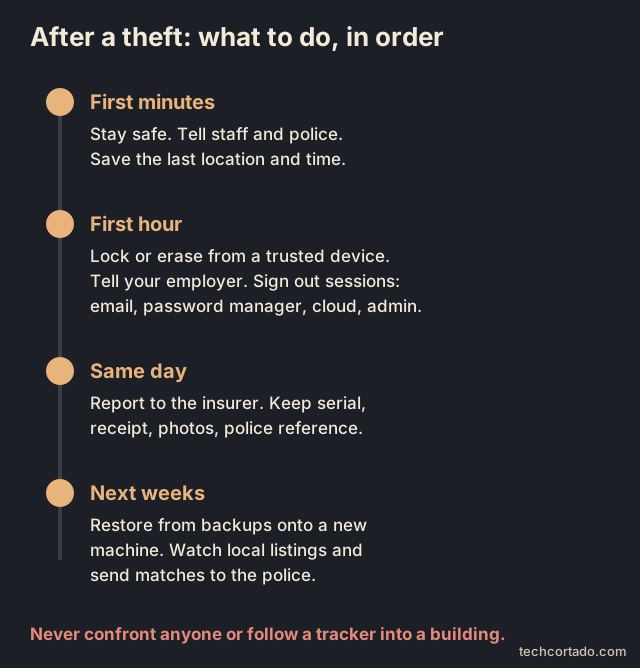
From a trusted device, use the relevant lost or lock feature, and think back to whether the laptop was off, screen-locked, asleep or unlocked and in use. If it held work material, tell your employer straight away. Then secure the accounts and credentials that were on it. We'd usually start with email, the password manager, cloud storage and anything with admin access, though that order is our suggestion and each provider's recovery steps come first. Signing out existing sessions and revoking tokens matters as much as changing passwords. Neither can pull back files that were already cached or copied offline.
Save proof before anything changes: the laptop's serial number, receipt, model, any distinguishing marks, the time and place of the theft, the police reference number and timestamped screenshots. Report it to your insurer promptly, following the policy's rules. Before you travel, ask your insurer about business use, which countries are covered, conditions for items left in cars, single-item limits, the excess and how replacements are valued. That's a list of questions to ask, not a description of any particular policy.8, 110
A remote erase can be an urgent step when the data at risk justifies it. You don't have to wait until every attempt to get the hardware back has failed. Don't assume it ran while the laptop was offline, and a tracker update doesn't prove it finished. Start restoring onto a trusted replacement from your tested backups right away, instead of waiting to see if the laptop turns up. Write down what was lost and which security settings were already on. That preparation turns a theft into a contained interruption instead of guesswork about every account and file.111
The tag routine is simple: pair it, name it after what it's really attached to, check how you'd reach it without the laptop, check the battery and test the alerts. The prevention routine is simpler still. When you leave, the laptop leaves with you.
Insurance, serial numbers and second-hand listings
Before anything happens, write down the serial number and take a few photos of the laptop, including any marks or stickers. Washington DC police point out that with make, model and serial number they can enter the device into the FBI's national crime database straight away; in the UK, registering it on Immobilise does a similar job.163, 162
Check your insurance before you need it. In the US, the Insurance Information Institute says most renters policies include off-premises cover, so belongings stolen away from home, including from your car, can be covered. Policies differ in whether they pay the actual cash value, after depreciation, or the replacement cost. A two-year-old laptop can be worth much less on paper than it costs to replace. Ask about single-item limits and business use too.177
After a theft, it can be worth searching local second-hand listings for your model for a few weeks. If you think you've found it, send the listing and your serial number and photos to the police. Don't arrange to meet the seller.3
Selling or giving away a laptop safely
A laptop you sell is a laptop that leaves your hands on purpose, so the same thinking applies.
- Back up and check the backup opens on another device.
- Sign out and remove it from your accounts. On a Mac, remove it from Find My so the buyer isn't stuck behind Activation Lock.112
- Erase it properly. On Windows, use Reset this PC with "Remove everything" and turn on "Clean data", which Microsoft recommends when you sell, donate or recycle. On a Mac, use Erase All Content and Settings.178, 179
- Know why encryption helps here too. NIST's media sanitisation guide lists cryptographic erase, destroying the encryption key, as a recognised method. A drive that was encrypted from day one is far easier to clean with confidence.180
- Remove stickers, labels and plates that point back to you, and update any registration such as Immobilise.
Twenty habits that make the layers work
- Pack up by default when you stand up. Then the cable never becomes an excuse to leave the laptop behind.3
- Check the anchor before you uncoil the lock. A chair that moves, a desk part that lifts off or a fitting the cable can slide off will undo the whole setup.
- Note the exact laptop model and lock SKU together. Add a photo of the right slot, spacer and fitted head. Buying a replacement gets much easier.12, 13, 15
- Keep the key on you. Store the spare away from the laptop bag. A combination should also be recoverable without the computer.
- Practise the lock routine at home. Engage it, give it a gentle tug, take the key or scramble every dial, then lock the screen.11
- Don't carry or lift the laptop by the lock. It's a restraint, not a handle or a strength demo.
- Check the laptop still sits flat. Try the charger, the ports you use most and the full lid movement before the return window closes.17, 34
- Give adhesive the prep and time that product asks for. A plate stuck on in a rush the night before a trip may not have bonded properly yet.27, 44
- Set a short screen-lock timer and check it asks for a password on wake. Use the lock shortcut when you step away rather than waiting. The timer is a fallback.
- Before travel, watch it shut down fully. A closed lid may only mean sleep. For sensitive data, check startup authentication as well as encryption.49, 54
- Check every drive. A well-protected system drive doesn't help much if all your work sits on an unencrypted second SSD.47, 48
- Recheck protection after repairs or firmware updates. In Windows, "encrypted" and "BitLocker protection on" are separate status lines.52, 53
- Keep the backup out of the theft. If the laptop and its only backup travel in one bag, they can be lost together.71
- Restore a file, then open it. A "backup complete" message is nice. A restored project you can open answers the harder question.86, 87
- Test recovery without your laptop or your phone. Register a spare sign-in factor in advance and keep recovery material safely elsewhere.88, 89
- Review admin access before a trip. Sign out of admin consoles you won't need, and delete old exports of passwords or recovery secrets. Keep server and backup logins limited to their job.
- Name tags after what they're attached to. "Laptop bag" is more honest than "Laptop" if the tag stays in the bag when the laptop comes out.
- Test alerts after changing phones or permissions. A paired tag and a working alert aren't the same thing.104, 105
- Keep an incident sheet somewhere else. Note the serial number, proof of purchase, support contacts, recovery portal and insurer details. Never put decryption keys on a sheet other people can open.8
- Review the setup after any change. A new laptop, bag, desk, phone, backup drive or password manager can quietly break something that used to work.
Three setups
These are example setups. They aren't price tiers or certifications. Each assumes supported software, current updates and a healthy machine. Match the extra effort to how sensitive the work is and how the laptop travels.
Everyday personal laptop
Start with BitLocker or Device Encryption, FileVault, or a supported encrypted Linux install, and check it's really on. Use a strong sign-in, automatic screen lock, an encrypted external backup kept somewhere else, and another offsite copy. Test account recovery and write down the serial number. Add a lock made for your exact slot if there's somewhere solid to anchor it. A compatible tracker helps with bags you forget.
Often the purchase that matters most is a backup drive, not a fancier lock. If your files only exist on the laptop, fix that first. If you already have a dependable backup, focus on being able to restore it and on whether the laptop you carry around is signed into too much.
Frequent travel or shared workspaces
Keep the same baseline, then pick a lock you'll actually bring, with a head that fits the machine and a cable long enough to reach the anchors you usually find. For sensitive work on Windows, use a supported startup PIN. Shut down for travel, back up before you leave, and keep recovery material and at least one backup at home. Test that you can reach the finding service from another device.49, 55
Carry fewer local files and fewer signed-in accounts. If one powerful browser session opens everything, an unlocked theft costs far more than the laptop. A limited travel profile or a separate travel laptop can make sense, as long as you have a working way to reach what you actually need. If you're also sorting out power for the trip, our power bank guide covers the laptop-sized ones.
Fixed desk or higher-sensitivity work
Improve the anchor and the storage around it, think about a compatible cradle or enclosure where the machine stays put, and decide who holds the keys. For managed fleets, write down who can use master keys and recover combinations. Use centrally managed encryption recovery, approved backups and an incident process that suits the organisation.46
If a laptop you left unattended looks tampered with, stop using it and bring in whoever is responsible for security before typing any passwords. Concerns about who had it can linger even after it's back. The NCSC recommends stopping use and reporting suspected tampering.1
Questions worth asking before buying a lock
| Ask the seller or maker | Why the answer matters |
|---|---|
| Does this exact SKU fit my exact laptop model and generation? | "Works with Dell" or similar is too vague. |
| Which slot type and spacer does it need? | Openings that look alike aren't interchangeable. |
| Will the laptop sit flat with charging and data cables plugged in? | A lock you take off because it gets in the way does nothing. |
| Is the stated diameter for the head, the steel cable or the outer coating? | Listings often put unrelated measurements side by side. |
| What exactly was tested, and can I read the report? | Cable strength, fixture strength and holding a real laptop are different things. |
| Is the code resettable, fixed, or recoverable by an admin? | This decides daily handling and what happens in an emergency. |
| Does the box include the cable, adapter and anchor? | Several products with similar names are parts or bundles. |
| What surface and curing conditions does fitting need? | Adhesive and screw anchors depend on what they're attached to and how. |
| What are the local replacement-key, warranty and return terms? | A global product page may not match what you buy locally. |
| Does any of the advertised protection include theft reimbursement? | A product warranty usually covers the product; theft cover needs its own clear terms. |
Where we'd start
For a confirmed Nano slot, compare the Slim NanoSaver 2.0 EQ with other heads that clearly list Nano, and pay close attention to clearance. For a standard slot, a dedicated MicroSaver 2.0 or a Targus T-bar lock is the simple route. For a wedge slot, compare a Noble lock listed for your exact model with Kensington's N17 range. For mixed slot types, the 2026 Kensington 3-in-1 2.0 does away with loose tips, while the Targus and StarTech models give you different ways of handling codes.34, 35, 42, 37, 38, 14, 30, 40, 39, 41
For a slotless MacBook, start with a mechanical adapter made for your exact chassis, or a desk station that fits. Only consider an adhesive option if you have a suitable surface and a plan for fitting it. At a regular desk, give the anchor at least as much thought as the lock head.25, 28, 44, 43
In the end, one question settles it. Will this whole setup reliably stop someone picking up this particular laptop in the places you use it? Once you've answered that, encryption and a recovery plan you've rehearsed limit the damage if it disappears anyway.
Quick-start: a 15-minute checklist
If you do nothing else today, do these. Each takes a minute or two.
- Check encryption is on. Windows: Settings, search "encryption". Mac: FileVault in Privacy & Security. Linux: check at install or with your distribution's tools.
- Find your recovery key and save it somewhere that isn't this laptop.
- Turn on Find My or Find My Device, then check the laptop shows up from your phone.
- Set the screen to lock after a few minutes and learn the shortcut: Windows key + L, or Control-Command-Q on a Mac.
- Start a backup to a drive or a cloud backup service. A first one running beats a perfect plan.
- Write down the serial number and take two photos of the laptop.
- Check your email and password manager have a second factor that isn't on this laptop.
- Turn on Dynamic Lock on Windows if you carry your phone everywhere.
Full checklist
| Area | What to do | Covered in |
|---|---|---|
| Habits | Pack up when you stand up; keep the bag closed and in sight | Prevent the easy theft |
| Lock | Match the head to your slot; anchor to something fixed; keyed or combination to suit you | Physical locks |
| Encryption | System and second drives encrypted; protection status checked | Encryption |
| Startup | PIN or passphrase before the system starts on travel laptops | VeraCrypt vs BitLocker vs FileVault vs LUKS |
| Recovery keys | Saved away from the laptop; tested | Recovery keys |
| Firmware | Supervisor or firmware password stored safely; USB and network boot off; Secure Boot on | Firmware and boot |
| Tamper checks | Seal or photo of the screws if the laptop sits in hotel rooms | Tamper-evident seals |
| Screen lock | Short timeout; Dynamic Lock or presence sensing where available | Screen and sign-in |
| Privacy | Privacy filter for trains and planes | Screen and sign-in |
| Second factor | Security key or passkey kept off the laptop; spare at home | Keep the second factor off the laptop |
| Password manager | Emergency Kit or emergency access set up | Plan for the day you can't get in |
| Backups | 3-2-1: drive plus cloud backup, versioning on | Cloud, local or both |
| Restore test | Restore and open a file each month | Test the restore |
| Account recovery | Works without this laptop or phone | Recover your accounts |
| Finding | Find My, Find My Device or Prey on and tested | Anti-theft software |
| Tags | Tag matched to your phone, in the sleeve or bag | Tracking tags |
| Marking | Serial registered; return label; UV or plate if you like | Stickers and marking |
| Tripwires | Optional canary tokens or decoy account, tested | Canary tokens |
| Travel | Belt last, laptop shut down, travel profile | Travel |
| Insurance | Off-premises cover and replacement cost checked | Insurance |
| After a theft | Police, lock or erase, sign out sessions, insurer | After a theft |
| Selling | Remove from Find My, reset with clean data, remove labels | Selling or giving away |
Frequently asked questions
Is a laptop cable lock worth it?
Yes, if you work in one spot and there is something solid to lock it to. A cable lock makes a quick grab slower, clumsier and more obvious. It can't promise the laptop won't be stolen, and packing the laptop away when you get up is still the stronger habit.
How do I know which lock fits my laptop?
Find the slot type for your exact model in its manual, then check the lock maker's compatibility list. Most laptops have a standard K-slot (about 7 × 3 mm), a Nano slot (about 6 × 2.5 mm) or a wedge slot (about 4.5 × 3.2 mm). Laptops with no slot need a model-specific adapter, an adhesive adapter or a locking station.
Is a keyed or a combination laptop lock better?
Keyed suits one owner who always has their keys. Combination suits hot desks, shared kit and anyone who loses keys. Either way, how well the head fits and what you anchor it to matter more than the choice between the two.
Is VeraCrypt better than BitLocker?
For most Windows Pro users, no. BitLocker with the TPM plus a startup PIN is simpler and recoverable through your recovery key. On Windows Home, check Device Encryption first. VeraCrypt system encryption is the free way to get a password before Windows starts on x64 laptops, but it takes the most effort and there is no recovery if you forget the password. A VeraCrypt container works on any system as an extra compartment.
Does disk encryption protect a sleeping laptop?
Not fully. Encryption protects data at rest. A sleeping or screen-locked laptop keeps its working state, and decrypted data can still be in memory. Shut down before travel, and use a startup PIN or passphrase for sensitive work.
What is the best way to back up a laptop?
Follow 3-2-1: three copies, on two kinds of media, with one offsite, and keep at least one copy the laptop can't delete. For most people that means an encrypted drive kept at home plus a cloud backup with version history. Restore a file now and then to prove it works.
Should I put an AirTag or another tracker in my laptop bag?
It can help, as a lead and not a promise. Pick the tag that matches your phone: AirTag for iPhone, a Find Hub tag for Android, SmartTag2 for Galaxy phones. A tag in the bag follows the bag, and anti-stalking alerts can tell a thief it is there.
Do "GPS tracked" stickers stop laptop thieves?
Nobody knows for laptops. We found no study of stickers or property marking on laptops. Studies of homes show that marking backed by publicity can cut burglaries for a while, but the effect fades. Registering your serial number is free and more useful after a theft.
What is a canary token?
A free tripwire from canarytokens.org: a file or link that emails you the time and the address it came from when someone opens it. Put one on a decoy account or USB stick, and pass any alert to the police rather than chasing it yourself.
What should I do first if my laptop is stolen?
Stay safe, then tell staff and the police. From a trusted device, lock or erase the laptop, tell your employer if it held work material, and sign out sessions for email, your password manager, cloud and admin accounts. Then report it to your insurer and restore from your backups.
Sources
The numbers in the text link to these sources, checked on 29 October 2026. Maker specs and test figures are the makers' own claims.
Show all 180 sources
- NCSC Advice for End Users
- NCSC 10 Steps to Cyber Security: Data security
- Metropolitan Police: Crime Prevention Advice: Distraction Theft
- British Transport Police: Travel safely by rail
- British Transport Police: Be Aware
- West Yorkshire Police: Theft from motor vehicles
- Police.uk: How to stay safe while visiting London
- Police.uk: Mark your property to deter burglars
- HP Compaq 6720t Mobile Thin Client: End-User Reference Guide, security-cable section
- Types of Laptop Locks: K-Slot, Nano & Wedge Explained
- Simple Solutions Combination Laptop Lock: K60213/K60214/K60215 installation guide
- How to Physically Secure Your Dell Computer, Monitor or Docking Station
- Kensington laptop lock selector
- N17 Keyed Laptop Lock for Wedge-Shaped Slots
- StarTech UNIVCS-LAPTOP-LOCK Quick Start Guide: Spanish
- Universal 3-in-1 2.0 Combination Laptop Lock: K63394WW
- TZ03TC Ultra Compact Wedge Combination Lock
- TZ06T Keyed & Resettable Combination Wedge Lock
- Register & Retrieve Program
- What is Pull Strength and Why Does it Matter?
- Noble Wedge Lock Technology
- 30 Years of Kensington Locks
- Trade Agreement Act Compliance: GSA Vendor Support Center
- ISO/IEC 27001:2022: Information security management systems
- Compulocks MacBook M5 Lock: Ledge adapters
- Universal Laptop Lock: The Blade
- Surface Preparation for 3M VHB Tape Applications
- Kensington Laptop Locking Station 2.0 with MicroSaver 2.0, UK: K64453WW
- Desk Mount Security Anchor Point: K64613WW
- Kensington launches Universal 3-in-1 2.0 laptop locks, 24 March 2026
- Kensington Universal 3-in-1 2.0 Keyed Laptop Lock
- Kensington Universal 3-in-1 Keyed Laptop Lock, K62318WW
- Kensington replacement lock-head tips, K62315WW
- Kensington Slim NanoSaver 2.0 EQ Keyed Laptop Lock, K60630WW
- Kensington MicroSaver 2.0 Keyed Laptop Lock, K65020WW
- Kensington MicroSaver 2.0 Portable Keyed Laptop Lock
- Noble TZ18T Low Profile Wedge Lock for Dell Consumer and Gaming Laptops
- Noble TZ04T Compact Wedge Lock with Barrel Key
- Targus DEFCON Ultimate Universal Resettable Combination, ASP96RGLX
- Targus DEFCON Ultimate Universal Serialized Combination, ASP96GLX-S
- StarTech UNIVCS-LAPTOP-LOCK official datasheet
- Targus DEFCON T-Lock Keyed Cable Lock, ASP48USX
- StarTech LTANCHORL large laptop cable-lock anchor datasheet
- Targus DEFCON N-KL Mini Keyed Cable Lock installation guide, PA400P instructions
- Targus Security Anchor Base Plate, PA400P
- StarTech Universal Laptop Locks for Deployments guide
- BitLocker overview: Microsoft Learn
- Full disk encryption (FDE): Ubuntu security documentation
- BitLocker countermeasures
- New Research Result: Cold Boot Attacks on Disk Encryption
- Device Encryption in Windows
- manage-bde status
- manage-bde protectors
- BitLocker planning guide
- How BitLocker PINs help protect your data and devices: NCSC
- Kernel DMA Protection
- Volume encryption with FileVault in macOS
- Protect data on your Mac with FileVault
- Protecting keys in alternate boot modes
- Activation Lock for Mac
- How to use dm-crypt and swsusp together
- Hardware-backed disk encryption: Ubuntu 24.04
- Hardware-backed disk encryption: Ubuntu 26.04
- Hardware-backed disk encryption requirements: Ubuntu 26.04
- Configure hardware-backed disk encryption: Ubuntu 26.04
- Frequently Asked Questions: Cryptsetup/LUKS
- VeraCrypt: Hibernation File
- VeraCrypt: Unencrypted Data in RAM
- VeraCrypt: Malware
- Find your BitLocker recovery key
- Tips for backing up your information (ITSAP.40.002)
- Offline backups in an online world
- CISA / MS-ISAC Ransomware Guide
- Restore your OneDrive
- Restore files deleted from your OneDrive
- Back up your Mac with Time Machine
- Keep your Time Machine backup disk for Mac secure
- Back up your files with Time Machine on Mac
- Back up and restore with Windows Backup
- Backup and restore with File History
- restic: Preparing a new repository
- restic: Encryption
- Borg: Quick Start
- Borg: key commands (change-passphrase, export, import)
- Borg: Additional Notes, append-only mode
- restic: Working with repositories
- restic: Restoring from backup
- Sign in if you lost your security key
- Get to know your Emergency Kit
- Find your Secret Key or Setup Code
- Generate and use recovery codes
- See devices with account access
- Apple: Use Find My to locate your lost Apple device or AirTag
- Google: How Find Hub protects your data
- Life360: Tile Network
- Life360: How Tile Works
- Pebblebee: Get started with Clip 5
- Apple: AirTag (2nd generation) technical specifications
- Google: Be ready to find a lost Android device
- Chipolo POP product page
- Samsung Galaxy SmartTag2 official specifications
- Life360: Use My Tile without a Subscription
- Apple introduces new AirTag with expanded range and improved findability
- Life360: Set Up Tile Smart Alerts
- Apple: Set separation alerts for an AirTag or item
- Apple: Alerts for unknown AirTag and compatible tracking devices
- Google: Find unknown trackers
- Life360: Tile Anti-Theft Mode
- Life360 Product and Services Terms
- Microsoft: Find or lock a lost Windows device
- If your Mac is lost or stolen
- Apple: Remove a device from Find My on Mac
- Engadget: Targus Defcon CL lock hacked (2006)
- SecurityInfoWatch / Associated Press: Laptop locks are often easy pickings for thieves (2004)
- VeraCrypt: Frequently Asked Questions
- VeraCrypt: Supported Systems for System Encryption
- VeraCrypt: Supported Operating Systems
- VeraCrypt: System Encryption
- VeraCrypt: Rescue Disk
- VeraCrypt: Hidden Volume
- VeraCrypt: Hardware Acceleration
- systemd-cryptenroll manual
- Apple: Set a firmware password on your Mac
- Apple Platform Security: Startup disk security policy control
- Lenovo ThinkPad user guide: UEFI BIOS passwords
- Lenovo: What to do if you forget your supervisor password
- Microsoft: Windows 11 and Secure Boot
- Thunderspy (Björn Ruytenberg, 2020)
- Invisible Things Lab: Evil Maid goes after TrueCrypt! (2009)
- Wired: Nail polish as a tamper seal (2013)
- Vice: It'll take more than glitter nail polish to stop snooping
- Backblaze: Computer Backup pricing
- Backblaze: Extended Version History
- IDrive: Pricing
- Apple: iCloud+ plans and pricing
- Google One plans
- Pangoly: Samsung T7 2TB price history
- Pangoly: WD 5TB My Passport price history
- Microsoft Learn: Dynamic lock
- Microsoft: Sign-in options in Windows
- Apple: Unlock your Mac with Apple Watch
- Microsoft: Managing presence sensing settings in Windows 11
- Lenovo: What is a privacy filter?
- Google: Use a security key for 2-Step Verification
- FIDO Alliance: Passkeys
- Bitwarden: Emergency access
- Prey: Pricing
- Prey: home page
- Prey for individuals
- Prey help: How to protect your devices with Prey
- Absolute Home & Office: FAQ
- Absolute: Persistence
- Google: Disable or deprovision ChromeOS devices
- Federal Register: DesignerWare, LLC; analysis of proposed consent order (2012)
- Laycock: Property Marking: A Deterrent to Domestic Burglary? (Home Office, 1985)
- Forensic property marking and burglary, quasi-experimental study (Security Journal, 2021)
- Aarhus randomised trial of forensic marking (Journal of Experimental Criminology)
- North Zealand randomised trial of burglary prevention (Cambridge Journal of Evidence-Based Policing, 2022)
- Danish Ministry of Justice: Burglary prevention report (2022)
- POP Center: Thefts of and from cars on residential streets and driveways
- STOP (Security Tracking of Office Property)
- Immobilise
- Metropolitan Police Department (Washington DC): Tips for preventing theft of laptops and personal electronics
- Canarytokens documentation: Guide
- Canarytokens: Getting started
- Canarytokens: MS Word token
- Canarytokens: MS Excel token
- Canarytokens: Adobe PDF token
- Canarytokens: HTTP token (web bug)
- Canarytokens: Windows Directory token
- thinkst/canarytokens-docker
- Microsoft: What is Protected View?
- Google: Browse as a guest on your Chromebook
- Apple: Change Guest User settings on Mac
- Microsoft Learn: Local accounts
- CATSA: Tips for stress-free screening
- Insurance Information Institute: Renters insurance
- Microsoft: Reset your PC
- Apple: Erase your Mac and reset it to factory settings
- NIST SP 800-88 Rev. 2: Guidelines for Media Sanitization
Image credits
Diagrams and the cover are by TechCortado. Photos and screenshots come from Wikimedia Commons:
- Laptop Kensington lock.jpg by Santeri Viinamäki, CC BY-SA 4.0, resized and converted to WebP.
- Kensington lock slot on an Acer Swift 3 laptop.jpg by Bobulous, CC BY-SA 4.0, resized and converted to WebP.
- Kensington Laptop Lock 1 2019-05-06.jpg by Fastily, CC BY-SA 4.0, resized and converted to WebP.
- Tape over laptop webcam.jpg by Santeri Viinamäki, CC BY-SA 4.0, resized and converted to WebP.
- Apple AirTag (51334123725).jpg by ajay_suresh, CC BY 2.0, resized and converted to WebP.
- VeraCrypt screenshot.png by JohnWilliamDoe, CC BY-SA 4.0, resized and converted to WebP.
- VeraCrypt encrypting screenshot.jpg by VeraCrypt, Apache License 2.0, resized and converted to WebP.
- Veracrypt Boot Loader 1.24 screenshot.png by MartinHero13, Public domain, resized and converted to WebP.